A getting to know you activity that worked!

Last week was the first week for the September cohort and in my first face to face lesson with my new group, I did a substantial getting to know you activity.

Step 1: the name game

The first step was getting them better acquainted with one another’s names (also indispensable for me getting their names down off the bat!) – I did my old reliable standby in which I start with “My name is Lizzie and I like running” and then Student 1 says “This is Lizzie and she likes running. I am X and I like y.” Student 2 says, “This is X and s/he likes y. This is Lizzie and she likes running. I am A and I like b. And so it goes on. With 15 students, it was a good challenge! And by the end of it, I knew all their names and they knew more names than they did before.

Step 2: the interview

I gave each student a sheet of paper with some questions printed on it. The questions had gaps in so that the students could complete them with their own ideas provided they fit grammatically. They were free to discuss their ideas together as they did it. Once they had done this (preparation), I moved them around so they were working with a new partner. With that partner they asked and answered questions and made a note of their answers, knowing they would be reporting to the whole class subsequently.

Step 3: the reporting

Before starting this stage, I gave each student a piece of paper with a table on it – one column for student name and one column for notes. Each student took a turn to introduce their partner. Those who were listening had instructions to write each student’s name in a new row and in the notes part, they had to note down anything in the report that was the same for them. So for example if the report said “Student x’s favourite animal is a dog” and the listener’s favourite animal was a dog, they’d write down “his/her favourite animal is also a dog!”. The purpose for this part was two-fold: one, give them a reason to listen, two enable them to find things in common with everyone in the class (useful for helping them on the way towards becoming a cohesive group).

Step 4: Filling in the gaps

Once they’d finished, they might have gaps next to some students’ names (either because they had missed what was said or because there was nothing in the report which was the same for them). The final part of the activity was for them to fill in those gaps. They had to do this by approaching the students for whom they had gaps and finding something in common with them so that they could write it in the gap.

At the end of the final lesson of the week, I had them complete short reflection handout (What I learnt this week… Good things for me this week were…because… Bad things this week for me were…because… Next week I would like to…) – prompts adapted from Dornyei and Murphy’s Group Dynamics in the Language Classroom. And the most commonly repeated good thing was around making friends and getting to know new classmates. This activity was a part of that.

It was a 2hr lesson and I think it probably took somewhere in the realm of 1.5hrs in total. There wasn’t time for a lot else in the lesson (just my sequence where they brainstorm ideas for studying effectively while they are at the college, I feed in a few more that I feel are important and often missed, and then introduce them to mindfulness meditation using a short video which explains what it is, how to do it and the benefits of it. Then we do an example one together. In future lessons we will start the lesson with that short meditation to give them time to draw breath after rushing in from their previous lesson.). Obviously the length of time it takes corresponds to the number of students.

If you try it, let me know how it goes! 🙂

“Let me hear the real you” M.E.T. webinar by Mark Heffernan and David Byrne

This double-act webinar was done by Mark Heffernan and David Byrne. You may have come across this duo at IATEFL if you attended. They also have a column in Modern English Teacher, who hosted this webinar. I haven’t encountered them before, but it was a really good webinar – if I were to attend an IATEFL in the future, I would totally look out for a session of theirs in the programme!

If you are they, or you attended the webinar, and see any mistakes in my notes-based summary, please comment and let me know!

The outline was as follows:

David particularly highlighted the idea of “Help your learners to find/make decisions”, saying that the role of teachers has changed over the years. We used to be arbiters of right and wrong, but now, we are facilitators of learning and discussion, our role isn’t to say what is right or wrong but to show possibilities and allow learners to make choices.

Writing

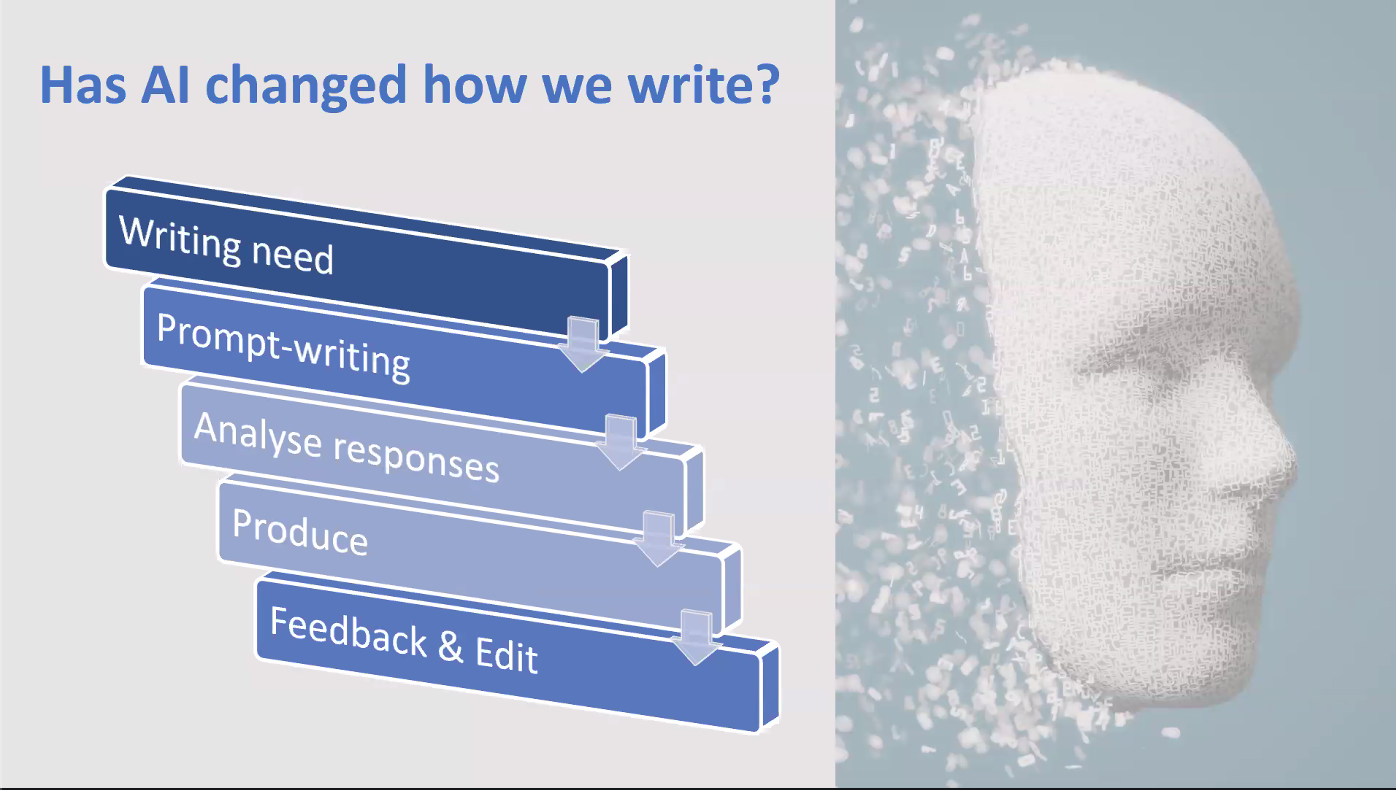
  • Has AI changed how we write?
  • Has AI changed how students write?

Yes.

Everyone (well, many people) uses it, to varying degrees of success, appropriateness and responsibility. If you don’t use it responsibly and effectively, it does wash out your personality/voice. In order to maintain your voice, you need to know what your voice is.

We have to train our learners on responsible, appropriate, effective use.

Questions we need to ask are: Who is the audience? What is the need (Why are you writing this?)? What role do you play in it? What role should/could AI play in this process?

E.g. a letter of complaint – if you will be all hedging/not cantankerous enough, you could use AI to write it and prompt it to add in some extra cantankerousness. If you are, you probably want your voice in there and will write it yourself. You have choices.

If we’re doing a test, AI is not appropriate unless it is built into the test. However, you could use it for brainstorming, ideation, feedback, suggested language chunks. It can be a learning tool. Most universities acknowledge and accept students using it in that way. What is generally prohibited is using it to produce text and submitting that. This is a change from two years ago and shows how things have evolved.

How do writers come across? How do you want to come across? It’s all about tone and voice.

The question becomes not did you get the grammar/vocabulary correct but is the text produced undeniably written by AI? If it is, it is not successful. If you have just pulled little language chunks from AI, then it could be.

You can teach a whole lesson on voice/tone but David/Mark suggest that is better to embed it throughout the course. Syllabuses tend to be spiral-shaped. Give students chances at multiple stages during the course to reflect and make choices. If we give them chances to do that, they have choices. It’s not a one and done lesson, appropriateness and AI can’t be a one off. It needs to be woven through. It needs to be scaffolded. The rise of AI has made it even more important than before to do this (teach about voice) but it was always important.

Speaking

When you speak, you portray a version of yourself, you make choices.

English learning and using depends on context: I need to be able to… so that I can… .

There is more than one correct way to structure an essay but we teach maybe the most foolproof way, the easiest way.

Hedging – it’s partly using modals, so it’s grammar but it’s also functional (you signal how sure or unsure, how strongly or otherwise you feel towards what you are saying).

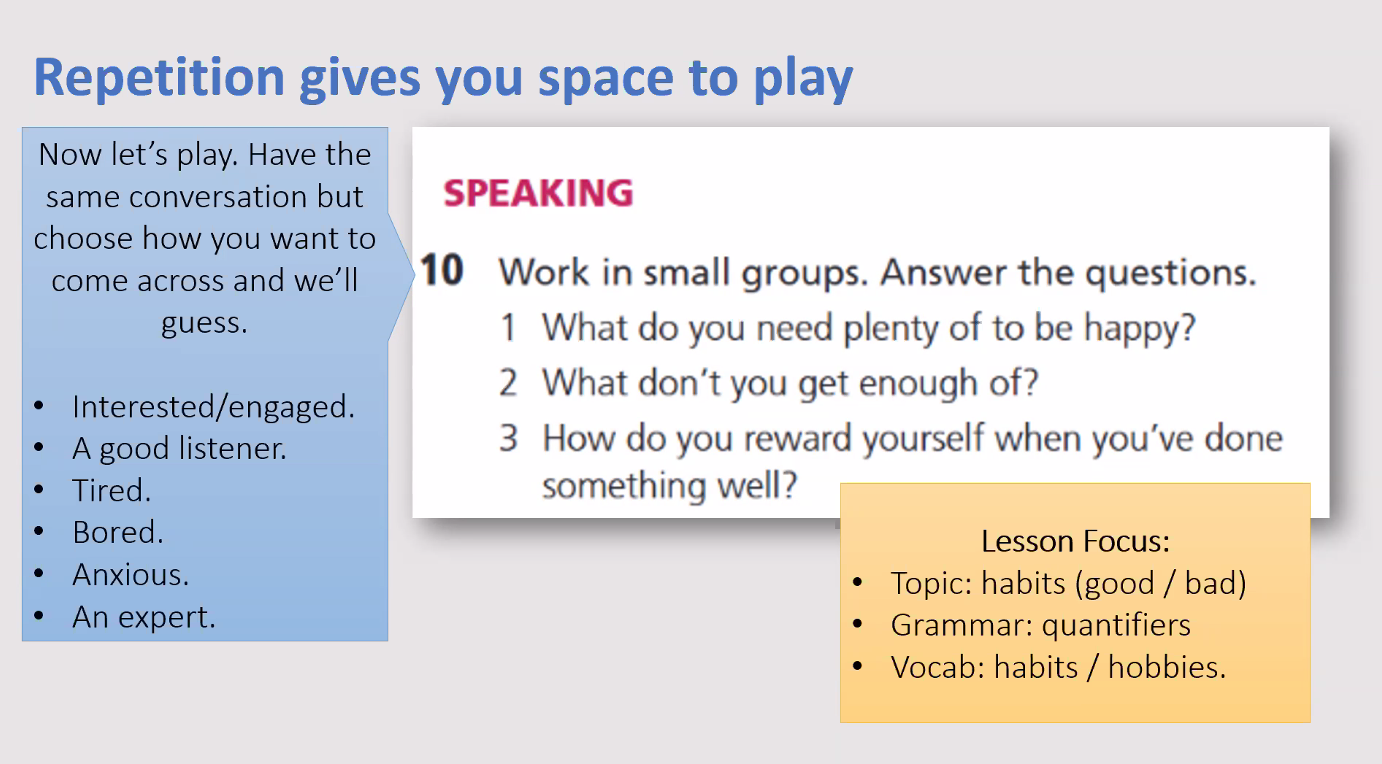
David and Mark shared some possible activities for working with voice/persona by weaving it into existent activities:

If you don’t show interest in what someone is saying, so you just listen and don’t say anything/interject etc, the speaker may feel lack of interest and lose confidence. If you see this happen in a discussion between students of yours, facilitate discussion of these kind of moments – e.g. this happened (X didn’t say or do anything while you were talking), why is that, X? How did you feel about it Y?)

My take-away:

We have seminar discussion exam preparation and then the exams coming up, and I want to try taking this approach to evaluating the example discussion recording (e.g. how did x respond, or not, how do you think y felt?), and to feedback on students’ discussions, and link it back to the language we teach them in order to enable participation. Get them thinking about what kind of persona they want to portray in a seminar discussion exam (e.g. engaged, knowledgable etc) and how to achieve that, as well as get them thinking about how to participate effectively in a real seminar. I might get them to repeat a practise discussion while playing different personas, to give them a chance to experiment.

In terms of writing (we are about to embark on extended essay writing on Monday!), I want to include more discussion of voice and, again, showing them that they have choices over how to express themselves in their essays and how those choices affect the outcome.

I feel I’ve come away with a load of ideas for how to slightly tweak what I already do, and hopefully thereby increase the value of it to my students: I call that a win! 🙂 Thank you Mark and David!

Teacher Identity

This blog post was inspired by Sandy Millin’s write-up of an IATEFL 2025 panel on the subject of Teacher Identity

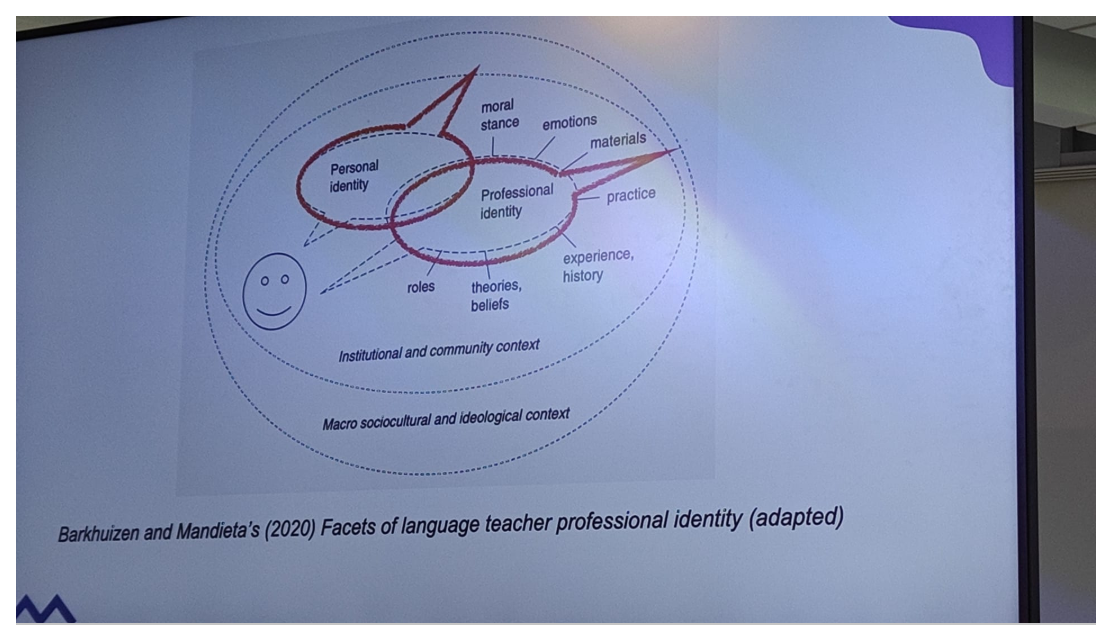
I think opportunities to discuss and reflect on teacher identity, such as the IATEFL 2025 panel written up by Sandy, are invaluable, as identity is constantly evolving and growing. In the first talk Sandy summarised, the speaker, Robyn Stewart, adapted Barkhulzen and Mandieta’s (2020) facets of language teacher professional identity to highlight the influence of the world on identity, external influence on it. It also shows the interplay between personal and professional identity and the elements that can be considered to be part of our professional identity:

Via Sandy Millin’s write-up of Robyn Stewart’s talk in the IATEFL 2025 teacher identity panel.

There are so many things that influence who we are in the classroom! One of the lessons Robyn Stewart drew from her dissertation research was “Don’t underestimate the role of context”. I’m inclined to agree:

On a personal level, I’m not that interested in generative AI, generally distrust it, disapprove of the resource consumption it represents and feel the amount of money, time, expertise and so on being ploughed into it everywhere could be better spent elsewhere (e.g. use of AI in medical contexts) rather than generating infinite quantities of text.

As a language learner, if I had the time, energy and spare brain, or was as driven as summer 2014 me, such that I could overcome the lack of all the afore-mentioned (and could override my concerns about unnecessary resource consumption!), I would perhaps explore the possibilities of communicating with it in Italian/French/German and using it to help me improve my production. I could get *well* in to a project like that. (And if I were teaching general English I could use the knowledge and skills I might develop in the process to help my students benefit from using the English version.)

However, my professional identity has the greatest influence on my interaction with AI: I have to embrace AI’s existence and figure out ways to work with students in a world which it is now very much a part of. In terms of context, I work specifically in higher education, preparing students to study at university by teaching them an Academic English skills course which they do alongside subject modules. Assessments are high stakes in terms of scores but they also need to ensure that students develop the skills necessary to succeed, including that of correctly treading the line between fair use of tools and academic misconduct regulations – a line that has been evolving with the evolution of AI. We used to mutter about Grammarly and translation tools, but ignore them other than prohibiting students from using them and putting a handful forward for misconduct each assessment cycle, and then generative AI came along and blew all that out of the water and onto a whole other level. We have been grappling with it ever since. However, it will only be come September of this year that I will engage with it fully as a teacher in the classroom beyond warning students off it (rather than only from the perspective of course coordination, course/materials development – as in, integrating teaching AI – related skills into our materials, currently in progress, rather than developing materials using AI – and misconduct evaluation).

The young Vietnamese participants in the study carried out by Hang Vu, the third speaker of the IATEFL 2025 panel on teacher identity, demonstrated a high level of insight and awareness into the issues they face in developing their professional identity as teachers in a world dominated by AI, and what kind of training they need in order to do that successfully. Sandy described Hang Vu’s idea of “emerging identities”, as summarised on the slide below:

Via Sandy Millin’s write up of Hang Vu’s talk in the IATEFL 2025 panel on Teacher Identity.

There’s a lot to think about there! I suppose I have mainly been teacher/coordinator as AI inspector in professional terms, but also teacher as learner as despite my personal misgivings: I have made an effort to attend (whether live or via recording) all the training available to us regarding AI. I have been teacher as AI user when I have used it to generate discussion questions (and then teacher as critical thinker when I have deleted half of them as unsuitable and edited/adapted others!). Teacher as AI instructor/facilitator, of course, as mentioned above, is still in the “coming soon to a classroom near you” stage. I suppose will have to be “teacher as AI supporter” within the “teacher as instructor/facilitator” side of things – regarding what we decide are acceptable uses of AI…but I predict it will be more along the lines of channeling inevitable use rather than encouraging use vs non-use! And I think alongside that, I will definitely be encouraging critical discussion in my classroom regarding the use of AI and surrounding issues. It will be interesting to see what the students think. It seems to me that just as much as the youngsters in the Vietnamese study, us old fossils who have been teaching a good while also need to regularly engage with our professional identities and figure out how we are going to move with the times professionally, regardless of (although obviously also interlinked/connected with/influenced by!) our personal feelings towards the various changes (which as Catherine Walters’ plenary discussed, have been many and varied over the last 50 years!)

Sandy’s post finished with some of the questions posed by the audience, one of which was “Should we proactively work with learners about how to do AI? Maybe we should ask learners for the whole AI conversation, not just the final result.” – It’s an interesting one. I definitely want critical discussion and to find out the students’ take on it, and as with other things potentially their feedback/ideas/thoughts can feed into future iterations of the course, but ultimately, in terms of assessment, what is and isn’t acceptable has to align with university and college policy on AI use. One thing I do hope is that I will be able to persuade students of the importance of developing their own voice, as I think if I can do that, then reasonable/acceptable use (with the appropriate guidance on how) will be a natural progression. For sure, all this thinking I am doing at the moment (I’m on annual leave – I have time to think!!) will be a useful form of preparation for the task ahead!

This blog post is plenty long enough already, yet I haven’t even scratched the surface of identity, personal and professional, and the interplays between identity and classroom. But, another time… 🙂

2024 – and what have I done?

It seems odd to think another year has elapsed. Feels like it began simultaneously yesterday and a million years ago! We are in our final week before Christmas. It is a non-teaching week but there are still plenty of other tasks to be done. I decided that one of mine is to look back and reflect on what I have done this calendar year…

Teaching:

  • The January cohort seems a long time ago but they completed their course between January and August this year. JFPH02 (January, Foundation, Physics, Group 2) was my group. They were a very mixed level group and a nice mixture of nationalities were represented. There were 19 of them but their attendance was abysmal so for F2F classes (of which there are 2 a week) it seemed as though I only had a much smaller group. A rotating cast of characters appeared each lesson, with only one or two whose attendance was much more consistent. Attendance was reflected in assessment scores! Low attendance was generally due to students struggling more on other modules and choosing to dedicate more time to them (or oversleeping and missing the 9am as a result of burning the midnight oil in that dedication!). It was frustrating and difficult, but I did my best with the situation, ensuring that those who attended benefitted from it, and ultimately that is all I can do.
  • This semester, I also did some teaching on a programme which consisted of 1-1 lessons on Google meet to women in a location with poor internet connectivity and limited options. They were speaking-focused lessons, with the other course component being app-based learning materials released each week. The 1-1 speaking sessions were based on the topic of the previous week’s materials. It was a very rewarding programme to participate in, as well as very intense (somewhat unsurprisingly)!. It was a very different kind of teaching to the kind I usually do and it was good to have the opportunity to experience it.

ADoSing

I started ADoSing in April 2018 so a fair bit of time ago now – over 6 years. Work is in flux at the moment and we aren’t sure how things will look on the other side but nevertheless this year I did another iteration of ADoSing the January cohort, with my co-ADoS. This included:

  • preparing January course materials
  • preparing and running induction sessions about our programme for the teachers joining us to teach on the January cohort
  • preparing and running weekly module meetings with the January cohort teaching team
  • preparing and running standardisation sessions for three pieces of coursework (reading, writing, speaking) and one exam (the speaking seminar discussion exam)
  • checking rubrics and .rbc files for coursework submissions
  • preparing Turnitin coursework submission points on Blackboard for two pieces of coursework
  • preparing Blackboard announcements for students, relating to coursework, mock exams, real exams, results, tutorials. Many of these include multiple versions due to reminders.
  • responding to queries from teachers
  • attending weekly ADoS team meetings
  • preparing writing exam standardisation materials
  • correcting any errors that show up in course materials
  • preparing submission points, Blackboard announcements, email templates and information packs about resits
  • generally ensuring the smooth running of the January cohort AES programme (to include all the other tasks not in this list but that nevertheless get done!)

This semester, while not actively ADoSing, I have:

  • co-led an SpLD project which involved preparing preview materials for students and listing content topics to act as a trigger warning.
  • worked on development for the 2025-2026 academic year course materials
  • been part of the process of deciding how to integrate the existence of AI into our assessments and course materials
  • started preparation for another January cohort which lies just around the corner!

One thing I will say about ADoSing, it is a good test of organisational and time-management skills! You have to always be thinking many weeks ahead of the current week so that everything is in place when it needs to be and all communications happen when they need to happen. You also need strong attention to detail as there are so many tiny bits of information in so many different documents (and also in things like submission points) in different locations with the potential to create big problems if done incorrectly.

Development

I’ve already written a post about the development I’ve done this calendar year so I will just mention some highlights here:

  • Instructional design course – 10 week course, now completed!
  • FutureLearn expert track on Autism (4 x 4 week courses)
  • Several online sessions about supporting students with SpLD and students with Autism
  • AI – focused sessions run by our digital lead (attended a combination of live online and via catching up on recordings)
  • Hatching a plan to do an EdDoc and doing some preparatory reading (lots more to go but the instructional design course maxed my development hours this semester! Still, there’s time! I’m not starting it until at least 2026-2027 academic year!)
  • Other than the above, I have also finally started blogging again, which I am really enjoying. I had forgotten about the joys of informal publication!

So, it’s been a pretty busy year, as ever! Another January cohort safely shepherded through two semesters. Plenty of teaching, ADoS tasks and professional development. A lot of learning.

Being as it is the 19th December and tomorrow is the last working day before Christmas break, I’m going to go out on a limb and say this is probably the last blog post for this year! I will look forward to picking it up again in the new year.

Thanks to all who have read and commented on this year’s posts. Merry Christmas to those who celebrate it and a happy 2025 to all!

What do you do in the first week of a new course?

(This post may seem somewhat counterintuitive at the end of a semester, just before the Christmas break, but I am looking ahead to our new January cohort who are beginning in the new year, which actually isn’t so very far away!)

I always love the first week of a new course. Our courses follow a blended approach with Semester 1 being 10 weeks at 6hrs of learning per week, divided up into 2 x 1hr online lessons and 2 x F2F lessons, and Semester 2 being 12 weeks at 5hrs of learning per week, divided up into 1 x 1hr online lesson and 2 x 2hr F2F lessons. In Lesson 1, we introduce the course, reviewing its structure, how they will be assessed and how to navigate the VLE (Blackboard). In Lesson 2, students attend a tech induction, to familiarise them with how to use Blackboard Collaborate (for the online lessons) and the Google Suite. In the 2 F2F lessons, students learn about the asynchronous learning content, including establishing the importance of it and guiding them through accessing it, and write a letter to the teacher introducing themselves. All remaining time in the F2F lessons is dedicated to getting to know you activities. There is one provided but teachers are free to use the time as they wish.

These are the activities that I always try to include in Week 1, together with an explanation of why:

In addition to the core content of the Week 1 lessons, there are some elements that always feature in my Week 1 lessons. Here they are:

  • The name game: Like the shopping list game where items are added at every turn, but in this case the items are a student’s name and something they like. This is generally the first activity in the first F2F lesson.

Learning students’ names is hugely important in establishing a rapport with them and being able to interact with them as individuals. For me, the easiest way to achieve this is by playing the name game with them. This is because as well as supporting students when they can’t remember a name or a like here and there, I am constantly repeating the information in my mind along with them. A class’s worth of repetition really helps to get the names embedded in my brain. As well as allowing me to learn their names, they get to know each other’s names as well which is helpful in the process of becoming able to work together effectively.

  • Focus on pair-work and group-work: This starts with a describe and draw activity where, in each pair of students, one student describes a picture that the other must draw without sight of it. The describing and drawing stage is followed by a brief evaluation, in groups, of what is produced and what is missed. Finally, students, in groups come up with a list rules for effective group work.

Pair and group-work are a core part of our lessons, but may not have been much of a feature in students’ previous learning. The describe, draw and evaluate portion of the activity is light-hearted and provides a low-stakes way to experience pair-work and group-work. It also provides inspiration for the following part in which students come up with their rules. These rules can be referred back to in subsequent lessons when students take part in pair-work and group-work activities. For neurodivergent students particularly, a clear understanding of what is expected in group-work, with rules to follow, can help to alleviate anxiety.

  • Introducing Mindfulness meditation: I start this sequence by showing a still (see below – and click on the link if you’d like to watch the clip!) from a short youtube clip about mindfulness meditation and its benefits, and asking them what they think the video will be about. They then watch the video and make notes, which they use to answer two key questions: What are the benefits of mindfulness? Which of those benefits would be most useful for you? In the final part of the sequence, I show the students the wording of an example short mindfulness meditation and suggest we try it, with me saying the words. Afterwards I ask them how they feel and finish by suggesting that we start each F2F lesson by doing it.

I have been using Mindfulness Meditation with students for some years now and remain convinced that it is beneficial for them. When they come into a lesson, their minds are all over the place – other lessons, assignment-related stress, workload, future plans etc – and doing a short guided meditation at the start of the lesson gives them a few moments of transition time, to really arrive in the lesson. Neurodivergent students particularly struggle with transitions so this is one way to make the switch from one lesson to another less abrupt and painful. The effect is always a class of students who go from being distracted by each other, their devices, their thoughts to being focused, calm and ready to learn. I introduce it the way I do (described above) to give them the opportunity to learn about and experience some of the potential benefits of meditation and evaluate which of those they would most benefit from, thereby turning it from being a random thing that is imposed on them to being something that they understand as beneficial to them. I do this in the first F2F lesson so that the second F2F lesson can already begin with it – start as we mean to go on! As we do the meditation at the start of every F2F lesson, it also becomes one of the many little routines which enable a secure, stable classroom environment for students.

  • Focus on strategies for effective studying: “How can we study effectively?”: This is a simple activity – students work in groups (getting to practise using the group-work rules they have already established) to make a list of strategies. Then, after eliciting all of theirs, I share some of my own.

Students generally come up with ideas that centre around study-skills, time management, organisation, collaboration and the like. My list contains some of those but also focuses on wellbeing, so for example “take breaks”, “exercise”, “meditate”, “try to get plenty of sleep”, and psychology, for example “have a growth mindset” and “tell your teacher when you have a problem”. Each item is accompanied by a brief explanation. Students’ two semesters with us are going to be loaded and stress levels are likely to be high, so looking after themselves is critical to being able to study effectively.

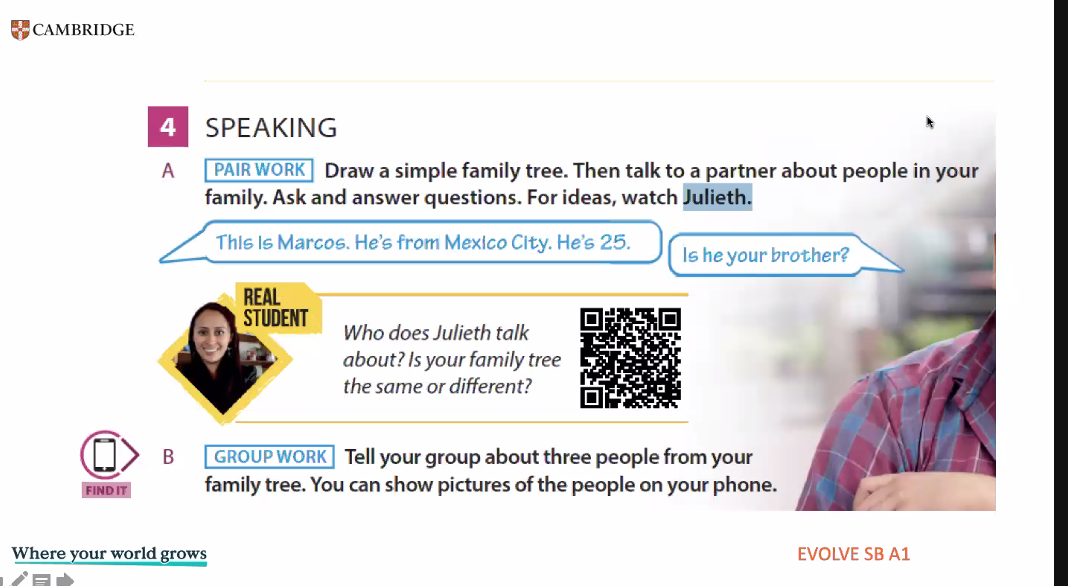
  • a speaking-focused icebreaker: this is less set in stone. My current go-to, though, is “Interview a classmate and then introduce them to the class”. Nothing spectacular, the task is scaffolded by a handout which guides students through question preparation and provides space for notes to be made during the interview. Students then use those notes to tell the class about the classmate they interviewed.

Speaking-focused icebreakers are useful for two key things: giving students the opportunity to learn more about one another (as well as me to learn more about them!), and giving me a reasonable starting idea of students’ speaking abilities. With the above-mentioned activity, I can listen in to their interviews to hear unprepared responses and then the feedback stage demonstrates what they can do with a bit of preparation and some notes. Of course I also get to learn a lot about them as people which is lovely. Happily, remembering it all isn’t critical because the “Letter to the teacher” activity which is part of the core content provides a similar swathe of information in written form. Both the speaking activity and the writing activity inform the initial RAG (Red Amber Green) rating we give students at the start of the course.

Why is Week 1 important?

Week 1 sets the tone for what is to follow. At the end of a good Week 1, you have a class who have started to mesh and who are prepared for what lies ahead. They know a bit about what is expected of them and a bit about what they can expect from your lessons. They feel positive, encouraged, comfortable, respected and this means their brains will be more open to learning. You also have a teacher who knows their students’ names and has started to get to know them as individuals, a rapport being built. These are the foundations of a successful course of study. Also, and I think you will agree, there is nothing like the excitement tinged with nervous anticipation of embarking on Week 1 and meeting your new group of students!

Over to you

What do you always do in the first week of a course with a new group of students? Why? Tell me all about your go-to activities for Week 1 using the comments function – I’d love to hear from you (well, read anyway!).

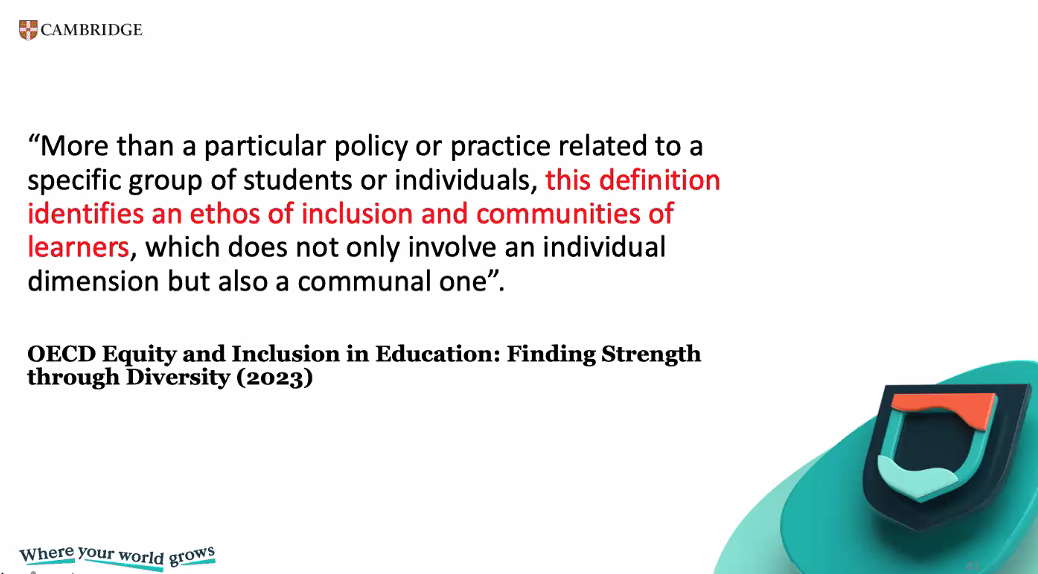
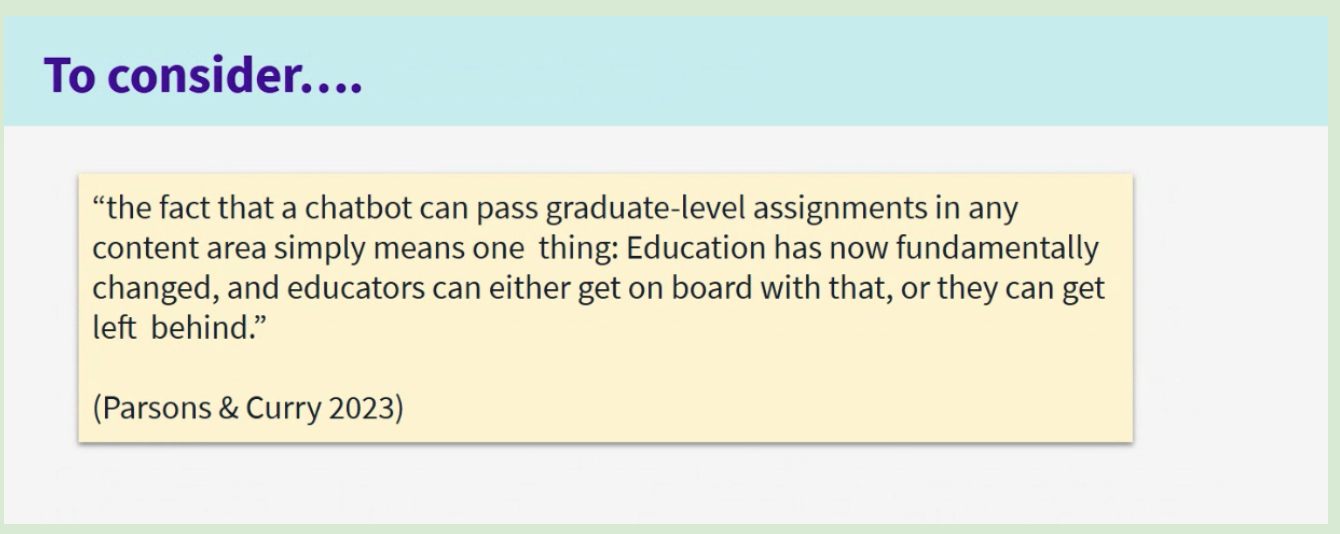
Generative AI and Assessment

A session about Generative AI and EAP that I attended recently provided the above quote for our consideration. I think one of the things that is challenging about the Generative AI landscape and its presence in the context of higher education is that it evolves so rapidly. This rapid evolution contrasts starkly with much slower-moving policy-making and curriculum development processes. Certainly in my current context, this issue of becoming “left behind” has been one that we have been grappling with for a few years now. Initially, there was a period where once generative AI had emerged into existence, all we could do was watch, as it became increasingly apparent that students were using it in their assessments, while awaiting a university policy to inform our response. An extra layer of waiting then ensued because as well as being university policy-informed, we are Studygroup policy-informed. During that wait, our response to generative AI had to be “No. You can’t use this tool. It is against the rules. It will result in academic misconduct.” Of course, being as assessment in pathway colleges is high stakes (the deciding factor in whether or not a student can access their chosen university course), students use it anyway, due to running out of time, due to desperation, due to self-perceived inadequacy.

Now, we have the university policy which centres on ethical and appropriate use of AI, and acknowledging how and where it is used, and, in cooperation with Studygroup, are figuring out how to integrate AI use into our programme. We started by focusing on one of our coursework assessments, an extended essay, and discussing what aspects we thought were and weren’t suitable for students to use AI to help them with. So, for example, we thought it acceptable for students to do the following in their use of AI:

  • generate ideas around a topic, which they could then research using suitable resources e.g. the university library website and Google Scholar.
  • ask AI to suggest keywords to help them find information about the topics they want to research.
  • ask AI to suggest possible essay structures (but not paragraph level structure)
  • generate ideas for possible paragraph topics
  • get AI to proofread the essay but only at surface level, to suggest language corrections (this would only be the case if we no longer gave scores for grammar and vocabulary so will require rubric-level change)

Of course we can’t just implement this, we need to go through the process of getting approval from Studygroup for it and then building it into our materials. We can’t just expect learners to meet our expectations with no guidance other than the above list embedded in an assignment brief. Much like was discussed in the AI and Independent Learning webinar, we need to help the students to develop the skills that they need in order to use AI appropriately and effectively. This will include things as basic as how to access the university-approved AI (Gemini) and how to use it (including how to write prompts that get it to do things that are helpful and appropriate and equally avoid accidentally getting it to do things that aren’t helpful or acceptable). Also important will be raising their awareness of ethical issues surrounding the use of AI and of its inbuilt bias, as its output depends on what it has been trained on and there is always the risk of “hallucination” or false output. They will need to be cognisant of its strengths and weaknesses, and to develop an ability to evaluate its output so that they don’t blindly use or base actions on output which is flawed. Their ability to evaluate will also need to extend to being able to assess when and when not to use it, and how to proceed with its output.

All of the above is far from straightforward! When you look at it like that, it’s little wonder that left to their own devices students use it in the wrong way. So, in order to have an effective policy regarding the use of AI, there is a lot of preparation that is required. That skill-development and awareness-raising needs to be built in throughout the course into all relevant lessons. And that means a lot of (wo)man hours, given our course materials are developed by people who are also teaching, coordinating and so on. In addition, teachers will need sufficient training to ensure they have the level of knowledge and skill necessary to successfully guide students through the materials/lessons where AI features. The other complicating factor is that the extent of the changes means that new materials/lessons cannot be implemented part way through an academic year as all cohorts of a given year need the same input and to take assessments that are assessed consistently through the year. So, if we are not ready by a September, then we are immediately already looking at a delay of another year. It is a complex business!

So, I absolutely agree with the quote at the start of this post but I think it is also a LOT easier said than done. As developing an approach in a high stakes environment takes time but generative AI and tide wait for no man. By the time we reach the stage of being able to implement our plans fully, they will probably need adapting to whatever new developments have arisen in the meantime (already there is the question of Google Note and similar which we have not yet addressed!). For sure, the assessment landscape is changing and will continue to change, but I do believe that we can’t rely on “catching students out” e.g. with AI detection tools and the like. We need to support them in using AI effectively and acceptably, so that they can benefit from its strengths and be able to use it in such a way as to mitigate its weaknesses and avoid misuse. Of course, as mentioned earlier, to be able to do that, we, ourselves, as teachers, need to develop our own knowledge and skills in the use of AI so that we can guide them through this decidedly tricky terrain. Providing training is a means of ensuring a base level of competence rather than relying on teachers to learn what is required independently. Training objectives would need to mirror the objectives for students but with an extra layer that addresses how to assist students in their use of AI, and how to help them develop their criticality in relation to it. Obviously there will be skills and knowledge that teachers have that will be transferable e.g. around criticality, metacognition and so on, but support and collaboration that enables them to explore the application of them in the context of AI would be beneficial.

Apart from the issue of addressing AI use in the context of learning and assessments, in terms of not getting left behind, we also need to ensure that what we are offering students is sufficiently worthwhile that they continue to come and do our courses rather than deciding to rely on AI to support them through their studies, from application through completion and side-stepping what we offer. But that’s for another blog post!

I would be interested to hear how your workplace has integrated use of AI into materials and lessons, and recognised its existence (for better and for worse) in the context of assessment. I wold also be interested to hear how teachers have been supported in negotiating teaching, learning and assessment in an AI world. Please use the comments to let me know! 🙂

Gen AI and Independent Learning

This was the title of the English with Cambridge Webinar that I watched today (linked so you can watch it too – recommended!) It’s divided into 3 parts – what autonomy is, activities learners can do with Gen AI to learn autonomously and risks to avoid. This post will offer a brief summary of that, followed by some ideas and thoughts of my own.

The first activity is to design an autonomous learner, sharing ideas in the chat. The usual kind of things came up – motivation, confidence, agency, enthusiasm. These wre compared with the literature e.g. Holec (1981) – “the autonomous learner can take charge of their own learning” but the speaker said we need to unpackage and update this. So that, it does involve the ideas that were put in the chat, as well as ability to manage their time and resources, awareness of learning strategies, resourceful (e.g. would think to ask an AI chatbot) but also critical (won’t just accept the response without evaluating it). However, teachers are also very important in the process – autonomous learners aren’t born but are made, with support from teachers. This is important because if you are autonomous, you will achieve better results and improve more quickly. Also, autonomy is important beyond language learning, in the work place, in personal lives etc – it is a lifelong learning and living skill. It goes hand in hand with critical thinking, which is also a key skill. You are also likely to be have better confidence and self-esteem.

The other speaker reminds us that most AI tools require users to be a certain age. E.g. ChatGPT is not for under 13’s and 13-18 year olds need parental consent. So, if you do any activities with students, ensure they are old enough to use them and whether you need parental consent. Then some activities:

  1. Using the Chatbot as a writing tutor. This is a back and forth process, where the student asks the Chatbot to highlight the mistakes but not correct them. The student then tries to correct the mistakes and repeats the activity. They need to tell the Chatbot explicitly not to correct them. This could go through several iterations until the learner has had enough, at which point they prompt the Chatbox to explain the mistakes. “What about this sentence? What is wrong with it? <sentence>” NB: the Chatbot can make mistakes – it can say there are mistakes when there aren’t.
  2. We were shown a sort of tabulated study plan for improving writing and asked what we think the prompt might have been to generate it. Critically: if you want something useful, you need to be very detailed in your prompt to get something useful back from the Chatbot. It was something along the lines of “My teacher says my writing has xyz problems, and I want to take a B1 writing test in 4 weeks. I will have to write x and y. Can you make a study plan for me in a table. Can you include information about what I should do and what resources I should use.”
  3. Similar to the above, we were shown a visual idiom guide and asked what we thought the prompt was. It was something along the lines of “I have to learn these phrases for next week. I’m not a patient student and I think I have dsylexia. Can you suggest some study guides. <Phrases>.
  4. Intonation – Voice chat in ChatGPT. You speak into your phone and you get audio back. “I’ve got to do a presentation. I think my intonation is flat. Can you help me? <Short extract from presentation> And ChatGPT can make suggestions. You can keep going back and forth. Say it again and ask for further suggestions.

(I recommend watching the webinar to receive a full presentation of these ideas!)

The final part of the webinar deals with the risks of using AI and how to avoid them. There was a poll asking “Has AI ever misunderstood you?” – There were a lot of answers with “yes”. AI is not faultless and doesn’t always understand. Then we are asked to think about what overreliance on AI might look at. Lack of creativity, quite formulaic answers, repetitive were ideas that came up from the audience. To avoid these risks, we need to train learners not to use AI too much. This is also where critical thinking comes in – learners need to be able to make effective choices in use of AI. We want learners to be confident users of AI but in a critical way. We want them to be thinking and reflecting on things like is AI useful, is it doing what it needs to do. Questioning them regularly, getting them to keep a journal of keeping it – when they used it, why, the result, would they use it again – to get them to think about how effective it is. Offering yourself as a resource in terms of support in using AI, that learners can talk to you and get advice when they want to. Cambridge Life Competencies Framework was talked about – there are freely available activities to use with students.

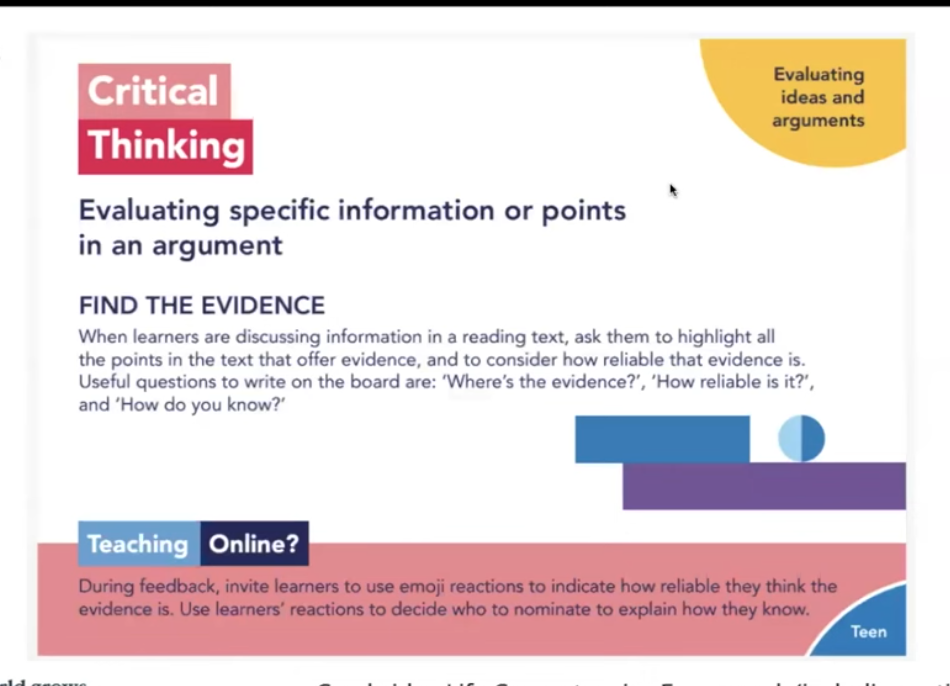
An example activity from this:

This can be used on a text that Generative AI has produced, to encourage students to question what is produced.

Another activity was to ask students to use for a chosen stage of a task. They should explain where they will use it, why they decided to use it for that stage of the task and then reflect on the outcome. This should be a supportive, encouraging environment. The key thing is encouraging reflection.

The final question was “Are you an autonomous learner?” directed at us teachers. We need to build up our knowledge and understanding of things like AI. This will enable us to be able to give support and advice to students. Turn activities into your own, adapted to your own context. We should also be a learning community in terms of AI, as it is new for us all. This would create a supportive environment rather than one of fear for using it in the wrong way.

The webinar concluded with 3 things to keep in mind: Purpose – you need a reason for using AI, don’t use it for the sake of it or because you think you should. Have a plan. Make it sure it fits the purpose. Privacy – any data that you put into GenAI chat becomes part of the data that the Chatbot uses. So anything you put it can be repeated to other users. Therefore don’t enter personal data about you, your learners or anyone else into it. You should also not put copyrighted things into it if you don’t own it. Planet – the use of GenAI has an effect on sustainability in terms of the environment and society as a whole.

My thoughts and ideas

The first thing that I couldn’t help thinking was that when I was learning Italian intensively and autonomously in the summer of 2014, I would have LOVED to have had access to GenAI! Being able to get instant basic feedback on my writing would have been very cool. I wonder how competent I would have been at handling the feedback i.e. at identifying which parts were valid and which parts were sketchy.

There’s also an AI tool we learnt about in one of the AI professional development sessions delivered at work, Google Notebook, where you can feed it a bunch of content and it converts it into a podcast which is a discussion between 2 “people”, in passably natural spoken language. It is called a “Deep Dive”. The usual AI caveats apply, in that what it churns out in the podcast may not be accurate to what was fed to it and it might make stuff up. Personally, I would have loved using it for Italian learning though. It would be really good for generating content to listen to, using topics and vocabulary that you have some familiarity with. You could read the texts in preparation. I don’t believe this is the intended purpose of the tool (it is supposed to be a research assistant, and you are effectively outsourcing reading and summarising texts to AI) but it would be a very good use of it! It would also mean the issue of accuracy was less acute, given the purpose of listening to the podcast/summary would be to practise listening rather than to make high stakes decisions based on that output!

Where I work, we’ve mostly been coming at it from the perspective of how to conduct assessments in a world where AI exists and students use it in the production of their written work. Being part of a university, the first stage was waiting for there to be university policy on it. Now we are at the stage of being able to integrate the policy into our programme. It is still a slow process as there is a lot of procedure to follow when you bring in new things. We are shifting from a zero tolerance policy, which obviously was not very effective but all we had to be going on with, to identifying how and when AI could be used effectively in students’ learning and where the boundaries are. We want to integrate positive use into lessons, which echoes what this webinar was saying. By modelling effective use and giving students opportunities to use it with support, and highlighting its limitations, we hope to help them become more AI literate and therefore less likely to use it in detrimental ways. Maybe at some point we will have to teach them about Google Note and the limitations of it, since it is likely something that they could use at university as part of their process.

It is nice to be moving towards a position in which we can acknowledge the positive elements of AI. Of course, as quickly as we adapt, so quickly will it continue to evolve. (The tools we learnt about in the session where we learnt about the “Deep Dive” – wow! I may turn my notes. or at least some of them, from that session into a future blog post…) I think, going back to the webinar at the root of this post, one of the great things about it (the webinar, that is) is that the skills and criticality, and ideas for teaching those which were presented, will continue to be equally relevant even though the ideas for using the AI itself will change and evolve. As for the part about learner autonomy, in my view they nailed it – it was so good to see them discussing it as something to bring into the classroom and develop (I have done a lot of work on that in my career – through classroom research, through publication, through conference presentations and webinars) rather than something that learners are or aren’t. So, as I said before, it IS definitely worth a watch! Also worth taking some time to look at the Cambridge Life Competencies framework and resources attached to it.

Tracking Professional Development

How do you keep track of your professional development? Where I work, we have a log (a Google sheet) which is shared with us at the start of each calendar year and which it is our responsibility to keep up to date. There are two elements (each with its own tab on the sheet),

1) Training log (mandatory) – “21 hours per calendar year, with a balance where possible between centre-wide development, programme-specific development and external development. These activities may include online or face-to-face training courses, talks, and workshops.”

2) Scholarship log (optional) – “…scholarship can be defined as broad and varied activities which are personal, but structured and reflective in their nature. This could be done by further qualifications or research. […] The definition of scholarship is knowledge acquired by study. In the context of learning and teaching, it might mean evaluating the impact of new approaches in your teaching or carrying out projects to answer specific pedagogical questions.”

I think it is good to have this framework for recording development, as otherwise I’ll attend stuff/watch stuff/do stuff, blog about some of it, but not have an overview. Recently 4C in ELT posted asking “How often do you actually seek out recordings to talks you missed and watch them?” – I was able to look at the log and identify at least 12 (there’s another session I watched via recording too that I haven’t yet added!) for this calendar year. I like accessing sessions via recording because then I can pause them whenever I want to (for a wee, to get a cup of tea, to have a thinking break…). Anyway, in total, in this calendar year, to date (it’s not over yet, for all it’s December already!), I’ve logged 129hrs in my training log (!)

The biggest chunk of that, weighing in at 50 hours, is the Instructional Design course I have completed this semester. 10 weeks, at 5hours per week. (The course reckons 5-6 hrs per week so I took the lower bound for logging purposes.) It includes synchronous tasks and a weekly one hour Google Meet session. There is also an optional assessment, creating materials using one of the tools which I did in a race against time, while I still had access to the free trial of the tool in question! It wasn’t a rush job but there were definitely extra hours squeezed into those weeks! I have been fitting the course in around everything else, piecemeal – Google Calendar and Google Keep have been my very good friends this semester, for keeping track of everything going on. (There are two more weeks of the course, but I’ve logged the course as one entry using the lower bound of the time, as otherwise there would be a million mini-entries of time spent! Suffice it to say it is unlikely to be *less* than what I’ve logged, much more likely to be more!)

The second biggest chunk, at 48hrs, was a FutureLearn Expert Track (which is a set of courses on a particular theme) – Autism: Developing Knowledge of Autistic Experiences:

I completed this Expert Track during the summer holidays this year – 4 courses, 4 weeks each, 3hrs per week. However, I did them in a more compressed time frame – more hours per week, fewer weeks. Hyperfocus is a wonderful thing!

So, those two, between them, account for nearly 100hrs out of the 129. It’s inevitable that a course is going to represent a larger number of hours than one-off things can. A distant third, in terms of chunks of hours, is the ELTC Away Day which accounted for 6hrs: A morning of talks and an afternoon of workshops, all F2F. For me the highlight of the day was the session in the afternoon about the EdDoc run by Sheffield University’s School of Education. In an ideal world I’d like to start doing one in the academic year 2026-2027. Since that session, which took place in late September, I’ve come up with an idea and started doing some reading around it – though the Instructional Design course temporarily moved further reading/preparation to the back burner (time is finite, however hard I hyperfocus!). Close behind the Away Day, in terms of hours, was a “slow conference” called Feminism X EAP, which I spent 4hrs on, not consecutively but over the course of a week or so. It seems a long time ago now, but it took place between the 9th and 15th May. It was really interesting, Story – by Bea Bond. It was Activity 2/3 on Thursday 9th May::

I recommend having a read! I hope there will be another slow conference next year, I’d never participated in one before but it is a format that really appeals to me.

The remaining hours have mostly been made up of watching recordings of various sessions and attending a small number of live online sessions too. Many of the recorded sessions I found via MyDevlopment which is our university professional development portal, combining internally made content and curated external content. Through it I discovered a treasure trove of webinars hosted by CareScribe – and in seeking out this link, I notice that there are a number of new ones which I am keen to watch when I can! Carescribe focus on neurodiversity and was founded by an NHS doctor, strategy consultant and software engineer in 2020, and the tag for their events page goes thus: “We run free online events to raise awareness and support neurodiversity in the workplace. See what talks are coming next and sign up below.” Highly recommended.

I wouldn’t have known about them without MyDevelopment, where some of the recordings are linked to as part of the curation side. I suppose one of the challenges of development is finding the sessions to attend (or watch via recording) in the great jungle of the internet. We are quite lucky in this regard. We have MyDevelopment, as already discussed, but it is a university-wide platform so it doesn’t curate ELT-specific content. However, our TD team put out a weekly bulletin via Google Workspace highlighting external opportunities amongst which webinars and recordings. There is also an internal one highlighting sessions the TD team is hosting and also sessions that University are running relating to education in general e.g. about AI, about Blackboard Ultra, about how to teach inclusively etc. Examples of sessions I’ve attended live online via MyDevelopment are Supporting Dyslexic Students and Students with SpLD and Supporting Students on the Autism Spectrum.

In terms of ELT-specific online sessions and recordings, there has been plenty of AI-focused content delivered and recorded by the ELTC TEL team, which I have accessed via a mixture of watching recordings on our ELTC TD portal (separate from My Development, just for our department) and attending live online when I can. I have also watched an older recording about pronunciation teaching in EAP by Gemma Archer (of Strathclyde University, at least at that time). In terms of external content, there was a recording of a Penny Ur session called “Getting them to talk in English” which lives on YouTube, recommended by Sandy Millin in one of her TYT Delta Newsletters (you don’t have to be doing the Delta to benefit from them!).

All in all, it has been a good (calendar) year for development, though I’ve not done much blogging. I think I’ve ended up instead with bits and bobs of notes – in the development log, in google docs linked to in the development log. Thank goodness for the development log, without it I would be like “ehhh I didn’t do THAT much development this year really, did I…how remiss of me” because it all becomes part of the blur of everything else we get up to at work (or in the summer holidays in the case of the Expert Track!) – but all evidence points to the contrary! Perhaps one of my New Year’s resolutions for next year will be to write more blog posts linked to the things I do for development/my reflections on it! (Perhaps I could put some of the links in the other tab of the scholarship log, which for this year is rather empty…)

Anyway, circling back to the question at the start of this post (and congratulations if you made this far!) – how *do* you keep track of your development? Do you have an effective system for it? And also do you have any links to cool stuff you’ve read or watched that you could share with me so that I can have a look too? 🙂 I look forward to hearing from you via the comments!

Instructional Design Course

I am 8/10 weeks through the Instructional Design course (link) run by some of the good ELTC TEL team folk. Their site is called The Training Foundry and on it you can find information about the courses, but also webinar recordings and blog posts. It’s pretty cool. This is the subtitle for the Instructional Design course (IDC):

“Our Instructional Design for Language Teachers course can help experienced teachers design flipped and asynchronous materials.”

It is a 10 week course and I would quite happily recommend it to anyone who is interested in principles of online learning and learning to use a variety of tools to design asynchronous content. It has a weekly live online session (using Google Meet), and each week there are also a series of tasks to complete. There is interaction between students (sharing output, commenting on others’ output etc) via a forum.

Most of the tools that we’ve learnt the basics in were actually new to me (with the exception of Google Slides [Week 1] but even with that I learnt new things about it!):

  • Wordwall

Wordwall (link) is a very user-friendly tool. It is subscription-based but I haven’t taken out a subscription, just using the limited free version for the purposes of the course. You can make the usual array of ELT activities. One I particularly like is called Word wheel. You input words and it creates a wheel in which each word is a segment of the wheel (looks sort of like a pie chart with equally sized segment). You can “spin” it and it will stop at random on one of the words you have input. You could then get students to define it (as we had to do in one of our online lessons, using vocabulary from an article we had read), for example.

Another online-based tool for making asynchronous content. Also requires a subscription but it offers a free trial which served the purposes of the course. It is pretty versatile. You input information into a form and it spits out an activity. You can also e.g. create a voice recording tool that you could embed into a page on your platform, or whatever asynchronous content tool you were using, for students to use for an activity, make interactive video activities, activities using pictures and much more.

As you can see, my free trial is coming to an end. I’ve had a good play with it though and really like it. But it is EXPENSIVE! So it is something that a business/institution/self-employed person might invest in rather than an individual. Our TEL team has access via institutional subscription, for example. I find it really visually appealing and quite intuitive to use. Interactive elements are built in, if a little limited. But limitations are lifted because you can also embed interactive content from e.g. H5P, Quizlet or its sister tool Storyline (see below for more information about this one!).

  • Storyline

This one, you have to download a programme onto your computer to do it rather than using it in a web browser. It is part of RISE so you can find it there. No screenshot because it only runs natively in Windows and I decided therefore to use an old spare Windows laptop (creak creak creak!) rather than subject my even older Macbook to “Parallels” which is required in order to run it. (Said macbook makes enough take-off noises for using Google meet, so! But for as long as it limps along, I shall use it!!) However, it effectively looks like powerpoint when you open the programme. The area you are working with is slide-shaped/screen-shaped. But unlike powerpoint it has a lot more power in the interactivity department. It has a timeline, it has “layers”, it has “triggers” and all sorts. The newest version also has AI stuff inbuilt. All of this stuff enables you to create a lot of interactivity in various ways. It gives you a 2 week free trial before kicking you out in the absence of a giant pile of moolah. We spent two weeks of the course on it because there is a lot to learn. You would use this if you were creating materials for a course that you were planning to run multiple times because it is a big time investment that is required to create stuff. At the ELTC it is used a lot for flipped content for the summer school and at the bit where I am (USIC) it is used as the basis of most if not all of the interactive content that we embed onto Blackboard for learners, to support the learning done live online and F2F.

In terms of using the interface, I struggled because using it on a computer that hasn’t got strong processing powers and hasn’t got a big screen, it made it even more time-consuming than it should be. Everything is tiny (the parts where you control the “layers”, the timeline and all that jazz) and you have to generate previews to check what you did works properly on a regular basis, and the computer had to strain really hard each time!

The rest of the course

This week we’ve been working on using video in online learning. Which, again, is very time-consuming and requires decent (probably fairly expensive) equipment to produce high quality stuff. We have learnt a bit about video editing (which I have done a little bit of myself in a hobbytastic kind of way!). Still to come in the final two weeks is zooming out to consider more about designing a whole course rather than sub-parts of it and then a final wrapping up and moving forwards week.

It’s been really nice to learn how to use all these different tools and challenge myself in this way. The final assessment was creating a storyboard and run of lessons in Articulate RISE and I am happy with what I have made for that (I have completed it early because of the whole free trial running out thing!). I based it on an AES listening exam lecture. It was also of course interesting to study some of the theory around online learning, as well as focus on making content accessible (which is a legal requirement!). Overall I think the course works really well, building each week on previous content and progressing logically, and the live online sessions definitely complemented the tasks and forum part.

Have you used any of these tools? Which ones do you favour? Do you use any other tools which I haven’t mentioned? There is a lot to keep abreast of, isn’t there!