ELTC TD Session: Reflections from BALEAP ‘Gen AI PIM’ Event – Tim Radnor

One of our teachers attended the recent BALEAP PIM: EAP and the Academy in the Age of GenAI: Implications for practices and practitioners and today is sharing his reflections on it. It will be interesting to hear about this and compare it with the AI-related talks that took place at the InForm conference that I attended sometime after this PIM took place!

The session will include a few reflections based on current research: focus on 2 conference presentations that Tim attended, on two aspects of how Gen AI and EAP intersect. We will also discuss how the issues raised may impact our professional practice.

We started by looking at statements from a session Tim gave in November 2024 and identified how things have changed since then:
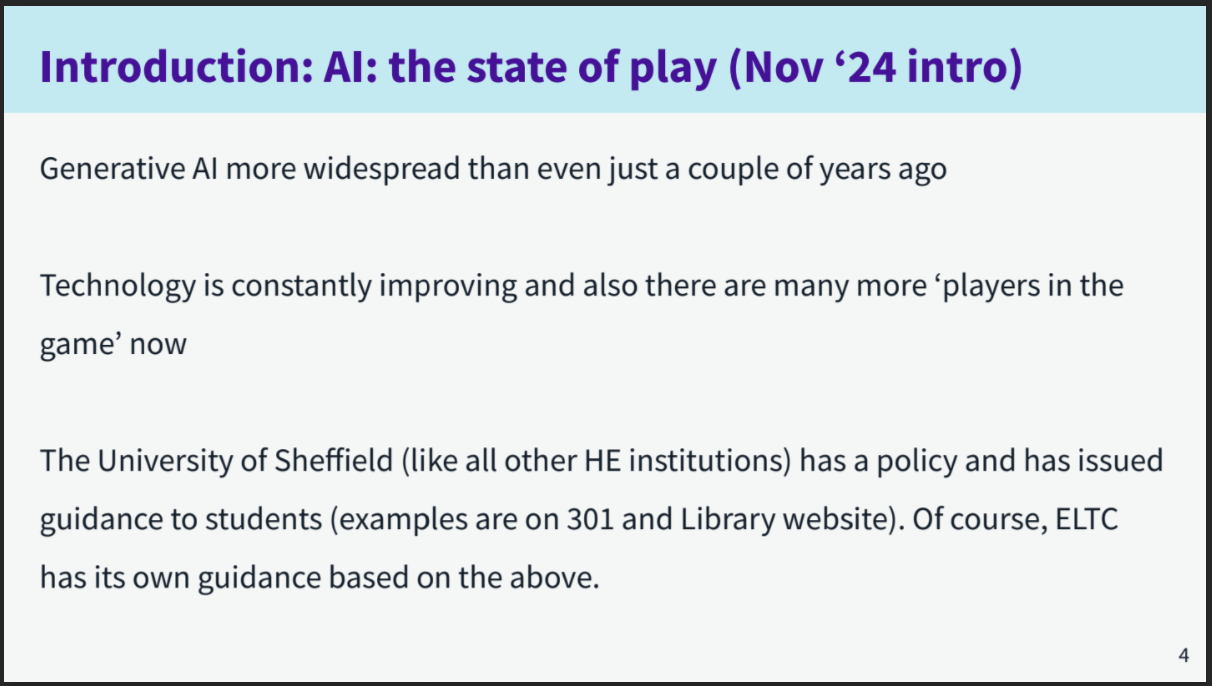
  • There were opinions that AI is even more widespread now and established now, and getting better at what it does, with more natural responses.
  • There is also more opportunities for creating AI tools e.g. Gemini Gems, so more customisable.
  • In terms of policy, it is on the way to become embedded in assessments and curricula here at Sheffield, but across universities policies are very different, there isn’t uniformity.
  • We are more aware of drawbacks including environmental damage, ethical issues, reliablity of results, information ‘dumping’.
  • Academic research into Gen AI and EAP has grown rapidly in the last two years, is much broader now.

In terms of the BALEAP day, there was a full day of presentations with 8 strands that each included several papers. There was a lot of overlap between strands. We are going to focus on two only:

First presentation: How Gen AI reshapes perceived academic writing ability in EAP contexts by Dr Elhadj Moussa BenMoussa (University of East London)

Tim had seen one of Moussa’s presentations before in the academic literacies BALEAP sig so knew of his research. Moussa’s study looked at student drafts of academic essays, then AI-assisted revisions of the same texts, as well as tutor feedback on draft and edited version. (Tim doesn’t know the level of the students or class they were in.) But they were in-sessional. And recurring patterns were found:

Before AI: writing weaknesses were visible and tutors could identify various issues e.g. grammatical errors, spelling, cohesion.

After AI: the text improved, weaknesses such as those above became hiddent beneath fluent prose but the thinking had not improved.

“The illusion of competence” was the speaker’s phrase. AI texts often appear fluent, coherent, academically structured (in terms of paragraphing) and confident in terms of style and tone. However, they may contain weaknesses in terms of argumentation, critical engagement, source integration, disciplinary reasoning and authorial stance (writer’s voice in other words). The speaker was looking at it from an academic literacies perspective. He found that the text appears stronger but the underlying understanding remains unchanged.
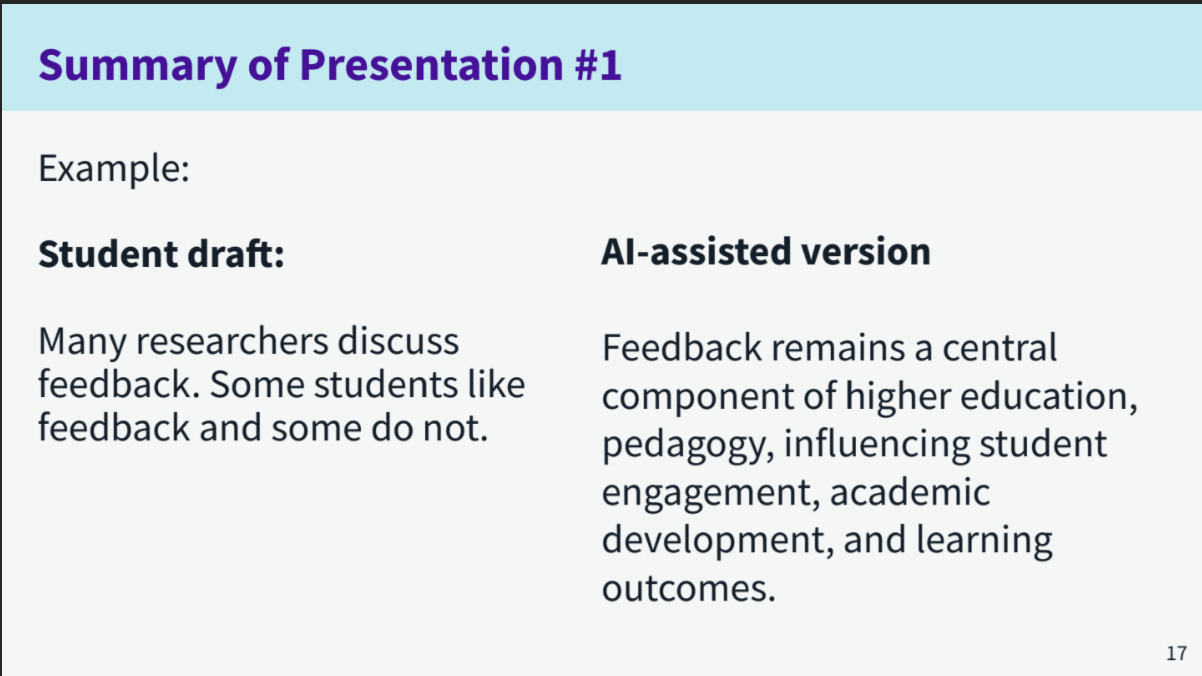
The AI version has added ideas, has better cohesion, higher level vocab. In the AI-assisted version, the element of the student’s perspective on feedback has been lost. If anything, the student draft is more critical even though simpler. The AI version has no argumentation in it. We are assuming an average level of simple, straightforward prompting. Prompting expertise doesn’t contradict the argument here however. The AI assisted version sounds more academic but does it demonstrate deeper knowledge? No, it is just descriptive.

Why does this matter to EAP?

Traditional indicators of proficiency are becoming less reliable for assessment as AI performs these automatically. EAP practitioners are uniquely places to help understand the shift to evaluating reasoning, knowledge, rhetorical decision making, source use and intellectual ownership.

Moussa argues that we need to “make thinking visible” (epistemic visibility was the fancy term used!). We need to make students demonstrate why they made choices, how arguments were developed, how sources were selected, how evidence was interpreted and how conclusions were reached. I.e. shift from what was written to how was knowledge constructed.

As a takeaway, Moussa recommended:
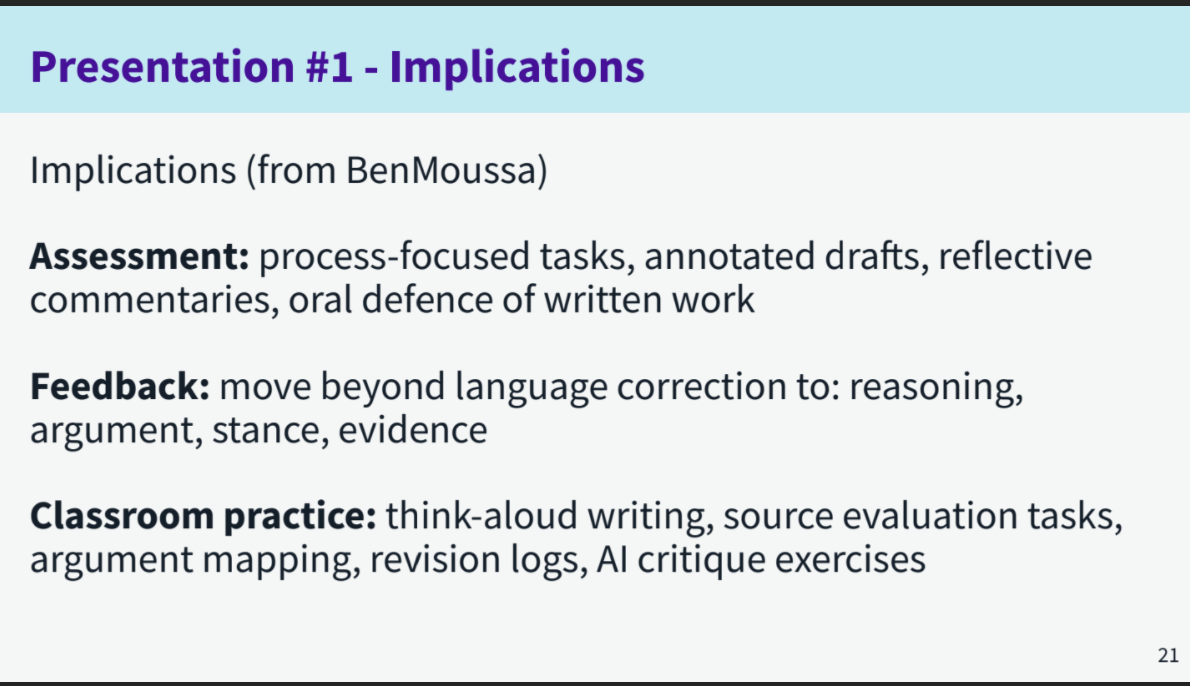
That was the first presentation. The next stage was to discuss for five minutes: what do you think the implications of these ideas are for how we adapt assessments, feedback on written work and classroom activities on EAP (pre-sessional, in-sessional, foundation…)?

Ideas shared in our session:

  • focusing on speaking rather than writing as more difficult to fake
  • focus on the process rather than the end product but at the same time do we need to go back to in-room exams rather than ongoing/project assessment? Not sure how much focus on process helps.
  • Have to accept they are using it and think more about how
  • More use of reflection on own learning progress with reference to specific lessons and learning materials
  • Given that students will be expected to be able to use AI effectively in future workplaces, it arguably makes sense to assess their ability to use it well rather than how they perform without it
  • A variety of assessment types to cross-reference for gauging student abilities
  • One of the things is in class helping to develop their analytical skills on the spot e.g. when we do a task in a breakout room, saying to students right now you’ve done that task, how easy or difficult is it (scale of 1 to 5), how do you rate yourself? (1 to 5). Make them think about it. Then, so why was it difficult? Why was it easy? To get them used to providing answers that aren’t AI-based, but are their own analysis of their learning.
  • Also for feedback on regular tasks, you can build in that critical process. Moving beyond lanaguge correction to looking at the ideas themselves and encouraging reflection.
  • Consciously use AI in a course programme and ask students to use it in a particular way and then they critique the output that they get
  • Adapting marking criteria
  • For each assessment it has to be stated what the parameters for AI are.
  • Bit of a paradox: that shift to arguing, styles, evidence etc sounds as if we have surrendered and are trying to engage students receptively but not productively?
  • Or is it more helping the students improve their reasoning etc as they produce the text and then polishing it with AI? If you can help students as much with reasoning and argument as with language, but you have to look at language as well e.g. how to do these things. But if you already have the reasoning formulated in depth, the polishing is less of an issue. The suggestion isn’t to copy and paste!

Focus on Gen AI literacy.

What do we understand by this term?

Ideas shared in our session:

  • writing prompts
  • being able to evaluate output quality and relevance
  • being able to use AI tools to enhance learning and productivity (ethically and appropriately)
  • knowledge and flexible application of AI tools for different purposes, i.e. social , academic, vocational activities
  • know how to use accurately and appropriately according to circumstances

Here is a definition of GenAI literacy from the literature:

Second presentation: “Student practices and experiences of Gen AI: developing a practice-oriented heuristic for GenAI literacy” by Julio Jiminez, Katherine Mansfield and Richard Paterson from University of Westminster.

Background: There is tension between institutional discourse (polices, integrity, guidance, how we teach it, recommendations) and student practice. Students are already integrating gen AI into their practice but in more nuanced ways than institutional discourse assumes. Policies struggle to keep pace with rapidly changing practices and technologies.

Research question: What do students actually do with GenAI in everyday academic life?

The speakers surveyed 441 students across 66 disciplines.

Findings:

GenAI is used by students for…

  • generating ideas (68%)
  • planning work (66%)
  • finding sources (33%)
  • receiving feedback (24%)

Note: Very different percentages between the top two and bottom two. They talked in focus groups with the students as well.

Key themes:

  1. Students use GenAI strategically: they pick specific tools for specific tasks; their selection takes into account what they consider the uses and limitations of the tool; their use suggests that rather than simply using tools because they are there, use is based on the fit between the task and the tool.
  2. GenAI literacy is emerging: students do critically evaluate the accuracy, reliablity and bias of tools and output and they are developing awareness of what is and isn’t appropriate use. To improve this, there needs to be ongoing decision making which is context-sensitive.
  3. Learning is increasingly human-AI mediated: GenAI is used to support planning, drafting and revision. However, students maintain their evaluative control over the outputs. Therefore, academic practice is becoming a human-AI hybrid process.

Overall, this all indicates that students’ GenAI literacy is moving beyond technical proficiency towards strategic, critical and context-sensitive use.

The speakers came up with 4 principles for how these findings could feed into approaches to teaching GenAI literacy:
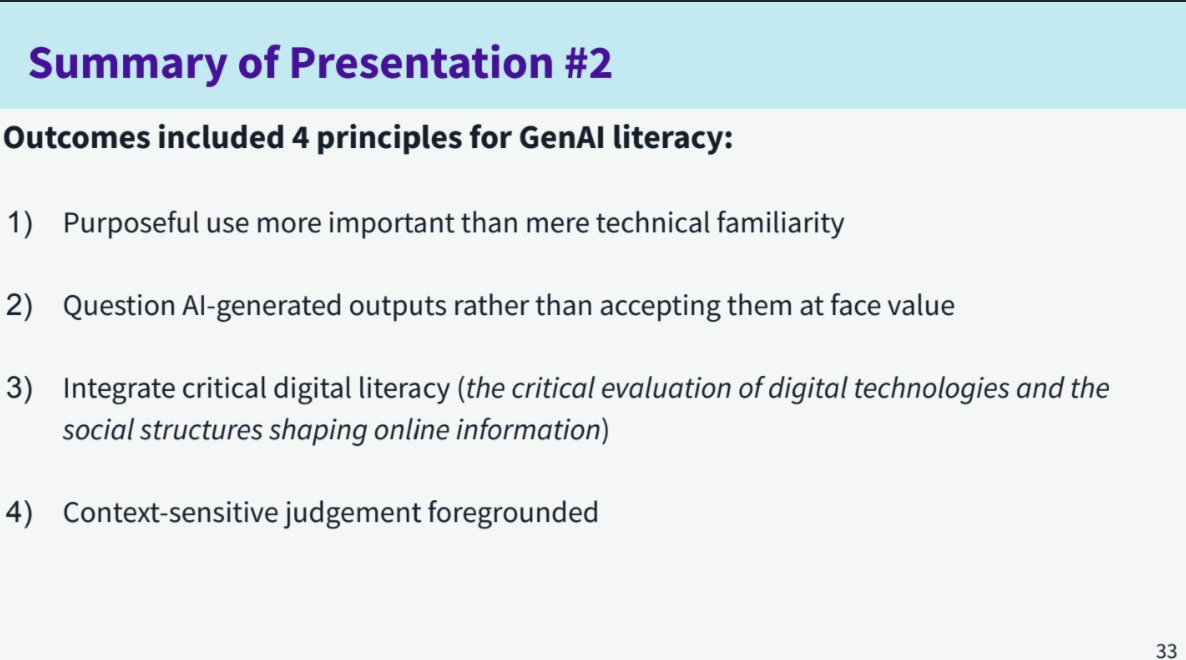
They came up with this framework (Framework rather than practical steps):
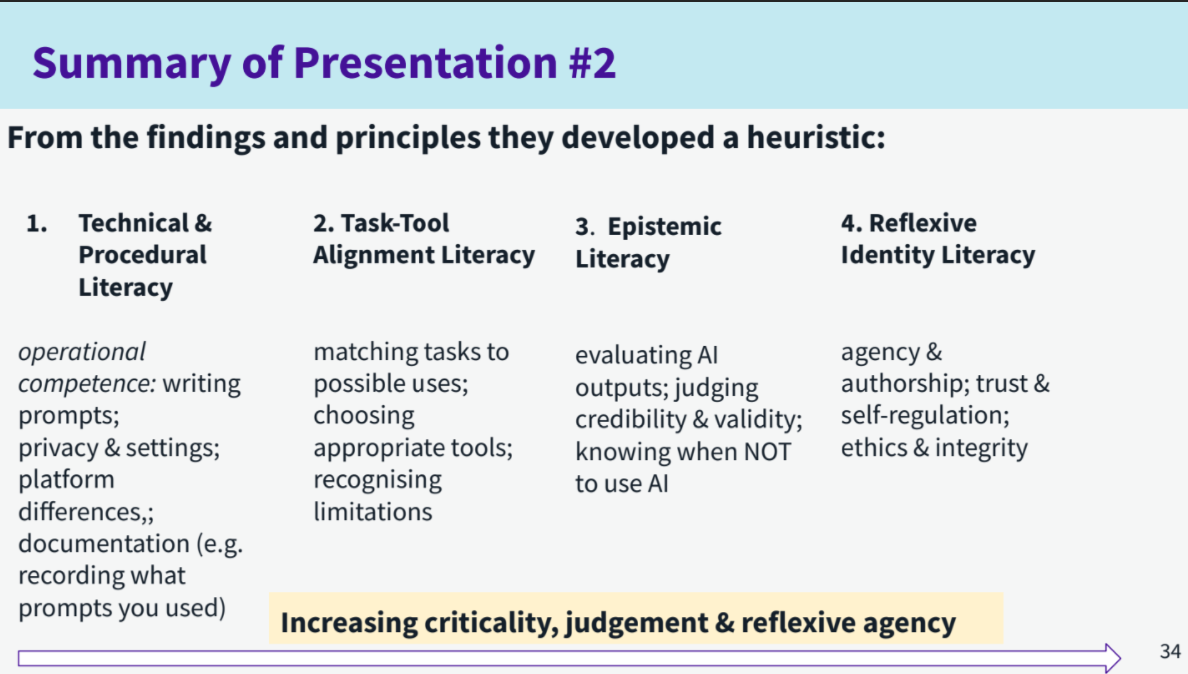
From left to right it moves from more basic to more complex.

Finally, we discussed the following more practical questions based on this session:

  1. Does any of your experience of student use of GenAI align with or differ from the findings in any way? How?
  2. How well does the heuristic (framework) match how students are taught AI lteracy in an institution or teahcing situation you are familiar with?
  3. Can you think of any practical exercises, workshops or courses for sudents that could incorporate the ideas from this session?

Ideas shared:

  • Students are given specific information about AI use but it isn’t incorporated into day to day activities. So one participant uses it in classes to help students become more independent users but class time is limited. Need longer sessions where you can demonstrate something and give students time to try it. So it shouldn’t be an add-on anymore.
  • Students used gen ai to create diagrams for their presentations and cited them as well as referenced their creations They were relevant and much better to support their speaking than looking for what approximates relevance for their topic – So creating visuals. It worked really well in conjunction with academic referencing/citing. They were responsible enough to cite and add sources if necessary. It helped them support their speaking. This requires increased literacy in terms of knowing about doing that and how to do it. However, with simple prompts they managed very good results.
  • Get Gen AI to write an essay in class and then get the students to analyse its weaknesses, such as poor argumentation and use of evidence. This requires criticality in this area.
  • Often a massive disconnect between AI-positive message from here and what people experience. There needs to be a more joined up approach.

Tim’s overall reflections on the conference were as follows:

  • he doesn’t know as much as he thought about EAP and AI (I think that is probably true for many of us!)
  • There is a lot of research going on into EAP and AI
  • EAP professionals have an important role to play in the transition to the integration of Gen AI in HE institutions
  • Students may be using GenAI in a more strategic, critical way than EAP practitioners assume

My thoughts:

My first take-away is how much student agency there is around AI. That whole strategic use thing. It suggests that it is really important in terms of AI literacy and how we teach use of AI to involve the students’ perspective as much as possible, to better understand their use and be better able to help them shape their use to fit the specific context in terms of what is and isn’t acceptable and helping them refine their use. I suppose the more confident we become about GenAI, the more confident and better able we will be to have these sorts of conversations with students.

Thinking about my specific context, this last academic year has been the first year where we have acknowledged AI rather than ignoring it beyond having a blanket ban which is impossible to enforce. We relied mainly on interactive content put together by the digital team, which we gave students time to complete in class. In the coming year, in contrast, the idea is to have in-class activities that are teacher-led rather than interactive content-led regularly in the first five weeks of the course and then at a few specific points thereafter. We will see how it goes!

My second main take-away is the difference between the student example and the AI revision. I can imagine a student who fed in the studente example and got back the AI example would be like “yeah, great, this is better! I’ll use this!” while their actual message has been lost. Of course, they’d need a clear understanding of both their message and the AI output in order to realise that. So I wonder how we help them become better able to do that. I need more time to think about that! I always need more time to think about things but time is in such short supply…
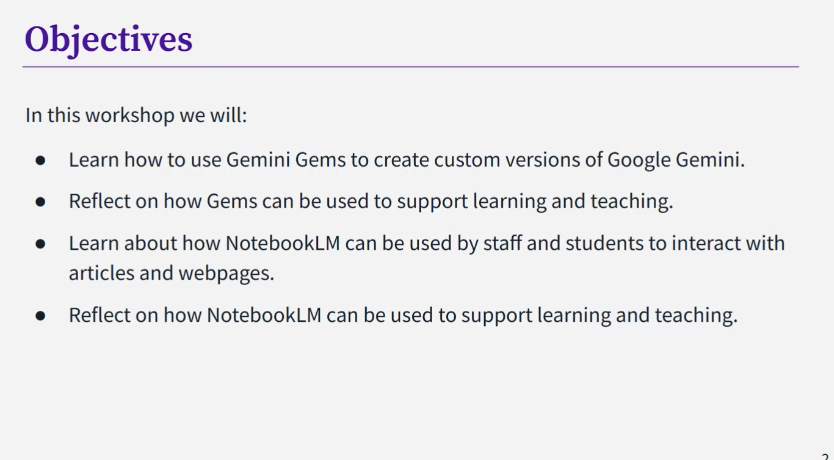
Gen AI: Gemini Gems and Notebook LM

Another university-wide training session relating to AI, which took place on Friday 22nd May!

Gemini Gems

Gemini Gems can be used to create custom versions of Google Gemini. They are a custom AI assistant. Gems are able to provide a more tailored and relevant response than a standard Gemini chat. It is a way of training Gemini to produce output that is more tailored to your needs. It does take time to create them properly but it could be worth the time required for using/making if you are always giving the same instructions to Gemini. E.g. Students could use it to make a personalised study assistant. Gemini also has some ready-made ones that you can edit. To share a Gem, you do it in the same way as other Google products e.g. docs/sheets (but you have to enable” Smart features” to do so). Ensure you make it view only.

There are limitations: Gems draws from the whole internet. You can feed it information – knowledge – to draw on, but if you ask questions outside that remit, it will bring in outside information just like Gemini does. And just like Gemini, it may hallucinate. There are ethical concerns about power consumption, copyright and data protection. Don’t put any sensitive data into it. While at the moment the university version is closed, who knows what will happen in the future, how that information could be used. Where it asks you to put in information, it can only be a pdf or similar file. Not a webseite. It is very easy to create something that almost works but a lot harder to get it to work properly.

Of course, we do still need to critically evaluate the output. If you don’t use Gemini that much, you might not find Gems useful as it might not be worth the time input required to set up effectively.

Notebook LM:

Notebook LM is a virtual research assistant. Instead of being based on a large language model, it is a retrieval-augmented generation (RAG) tool. All responses are based on the sources you provide, rather than drawing on everything available online. It is a double-edged sword – it is really useful for looking at large quantities of text etc but it could quite easily do your work for you. So it is important to develop effective use of it.

You can upload sources, interact with them via a chat tool. It will ask you to upload your files/content. Click insert. You will see the documents appear that you upload. Without being asked, it will give you a summary of what is in the documents. Those documents are your knowledge base. Then, you can give it an instruction e.g. “I am an educator working in UKHE specialising in [digital education]. Draw out five key points from the sources relevant to me and present them in succinct bullet points.” and it will carry that out.

It is a little language model of your own that you can interrogate as you wish. E.g. find three areas of disagreement between these sources. So if you have a long document to explore, you can ask it anything you like about it. You can untick a source if you no longer wish it to be used in the responses. It will always keep trying to please you, ask you questions, engage you but it doesn’t hallucinate content that isn’t in the sources you have uploaded.

You can also do this: “I’m an undergraduate student writing an essay on ‘Identify the pros and cons of AI use in higher education’ – can you write me a 500 word literature review?” – obviously a danger here that you are offloading your work onto the AI and then if you use that information, it is ethically questionable in terms of false authorship. In “studio” you can ask for other outputs e.g. an audio file/pod cast. These can take a while to generate. You can get a 1 – 1.5 mins introductory piece or a 10 minute discussion between two voices. Students could put notes they have made into LM and get it to make audio out of it to help with revision. This could be useful for neurodivergent students. It can also turn it into a slide-based summary. All of this is entirely based on the texts you have inputted. A slide-based summary could be useful for a visual learner. What you can’t do is edit the output. It is what it is. You/the student can also generate quiz cards or mindmaps to help with revision. It gives you more options of ways to engage with the material other than reading huge bodies of text.

In terms of limitations: you need have knowledge of the information you upload in order to evaluate/trust the output. And just like other AI, there are the usual ethical concerns, copyright and data protection issues. You should avoid using it with unpublished draft papers or other confidential research materials, as well as any sensitive information.

Love it or hate, it is available to all students and staff here! It does things that we don’t want students to do but it does save time and we can’t stop people from using it. So, we need to try and help them engage critically. Hopefully our increased awareness helps us be better able to do this. Use with caution is probably the best description.

Assessment and generative AI

This was an internal workshop which was aimed the whole university not only us ELTC folk. Being the end of marking week and my work week (final hour thereof!) it was a good chance to grab the opportunity to do some development (woohoo!)!

The plan was to reflect on the impact of gen AI on assessment, hear about the university’s new common approach to gen AI in the curriculum and then focus in on what fair and appropriate use of gen AI in the context of an assessment might look like and what an “AI-required” assessment might look like.

Here are my notes from the session:

Currently, students can gain a passing grade or even a high pass, using AI in a written assessment. This use is not something that we can detect accurately and fairly, and therefore we can’t ban it as the ban would not be enforceable. However, that does give us the responsibility of ensuring that students use AI well and effectively, and develop appropriate knowledge/skills. We also have to prepare students for workplaces where AI will be used (though as yet what exactly this looks like is unclear!). So, rather than focusing on the negative impact on assessment, we should use these developments as an opportunity to focus and reflect on what, how and why we assess, with a view to improving the process for all concerned.

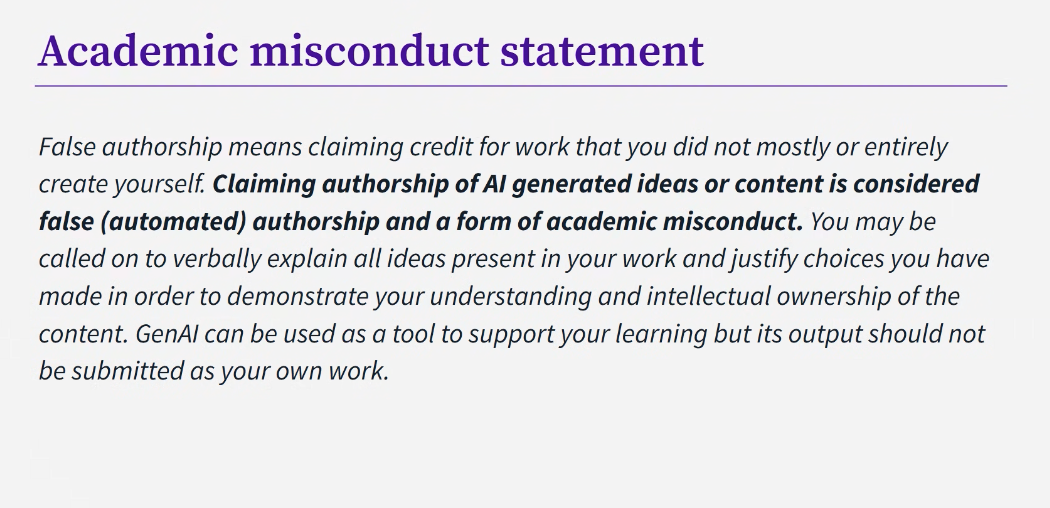
By Sept 2028, all programmes at the university will include 2 summative AI-Required assessments annually. Well, not *all* – this applies to Year 1 and 2 of undergraduate programmes. “AI free” and “AI-required” assessments are to be explicitly categorised. In AI-free assessments = it should not be possible to use AI, and skills must be demonstrated in an environment where AI assistance is not possible. The choice to do this type of assessment should be grounded in the learning outcomes e.g. communication and interpersonal skill evaluation, development of oral defence and articulation skills, verification of minimum competence, preparation for high-stakes professional contexts, simulation of professional practice conditions. In AI – required assessments, students would have to use AI in some way in order to complete the assessment and develop AI literacy in the context of their subject.

For all assessments that are not labelled either “AI-free” or “AI-required”, fair and appropriate use of AI should be possible (as long as it doesn’t constitute “false [automated] authorship”) in a variety of ways. We should include a statement on AI and academic misconduct (see below) on all assessment briefs. Alongside this, we need to teach students what good use of AI is in the context of a given assessment. However, this should not just be a list of what is and isn’t approved, as that is not something we can enforce in terms of the things on the “what isn’t” list.

There is still quite a lot of grey area – how to define “mostly” or “entirely” for example – where is the line? It does require unpacking for us to understand it fully and communicate to students effectively what it means.

Next, we looked at a generic task and what would be fair/unfair use of AI. Using AI to support elements of the task that the student is doing themselves and getting feedback of what they have done, are examples of appropriate use. A question that arose from a participant: Does getting AI involved in this way minimise student development in terms of the editorial process? Or, does it help them develop the ability by showing them a model of how to do it? It was suggested that perhaps it depends on whether the student lets the AI have the last word. That is, if the student simply adopts the AI comments wholesale without critique, then possibly the overall effect on the development of editorial process is negative but if the student approaches it critically, and learns from it, perhaps it can be helpful?

How could we communicate effective use to students? How could we adapt the task to discourage inappropriate use? Need to be careful of “traffic light” systems because they are not so suitable as we can’t actually enforce the “red” area rules. We need to talk to students about it, come to a shared agreement with them. There is also an issue that students have access to widly different AIs, of varying power. For AI-required assessments here, Gemini should be used – but again, how do we enforce that? Answers on a postcard! AI isn’t limited to LLMs, a participant suggested we need to consider what other platforms/programmes that exist and might support students. The response was that in large part, the focus on LLMs is because they are applicable to everybody, while more specific AI have more specific subject applications. To consider others, you need that more specific knowledge and skill set. (Which is an issue for departments and department-specific training I suppose!!)

Currently, there are some things that students can do better than AI but how long will it be until AI does do everything well in relation to the task? Then we won’t have that option anymore. Probably we are not that far from it. Is it worth putting in for major changes to an assessment when it takes 2 years for that to go through by which time the changes may be obsolete? E.g. hallucinations are getting rarer and it is less likely for it to use invented sources. A more current problem is it won’t go for the best journals or do a great job of assessing what is good or not. But then, you can get round this by specifying in a prompt what you want to be included/excluded. Assessing students in real time, using pen and paper, rather than digitally is an option, as is making the task more personal, having to draw on student experience rather than a generic case.

What about AI-required assessments? AI use might just be a component of an assessment, not a whole assessment that is about use of AI. It doesn’t even have to include student use of AI tools. They could look at pre-created content, talk about why they have decided NOT to use AI, analyse use of AI in a specific context, create a plan for how AI could be used ethically etc Students can ethically object to using AI but should still be able to learn about it.

So what might an AI-required assessment look like? What we need to start from is what skill do we want them to develop by using AI in this assessment? The university are putting together an AI literacy bank, broken down into Awareness, Competence and Ethics, which we can use to help inform task design/adaptation. In our context, students are in the very early stages of their academic journey so we would need to pick out what these students would most benefit from at this stage in their academic journey. [This is useful information as we were wondering if and how this would apply to us. Looking at the framework, it should be possible to identify which element(s) are possible for us to integrate and assess, building on what we have done already in this direction.]

We were asked to suggest modifications to the example task, and responses were more muted – possibly because it was quite complicated and there wasn’t much time!

It was noted that an AI-free assessment should be AI-free for pedagogical reasons, we should have a pedagogical justification. It is a descriptor rather than a label to adopt because we are scared of AI and student use of AI. As we start adapting assessments, need to think about what sort of changes – administrative, minor or major changes – are required. The reality is, the majority of changes relating to AI would hopefully fall under administrative changes: changing how the task is written, changing the information in the assessment brief provided to students = relatively quick to make. Changing an assessment type completely would then be a minor adjustment and require a longer process. A major change is to the programme level learning outcomes, so is unlikely to apply here. So anything around assessments would be classed as at most a minor change. We’ve got two years lead time – January 2028 ready for September 2028 intake would be when to put through minor changes to assessments. [Obviously for us on the AES (Academic English Skills) programme, it is a bit different as Studygroup timelines and processes are involved!]

It was an interesting session. Currently, our coursework assessments are neither AI-free or AI-required, and we have tried to encourage students to use it ethically to support their learning in the context of a given assessment rather than to do it for them. We have adapted our criteria for the writing coursework (extended essay) so that students need to do the skills we teach (critical evaluation, synthesis etc) well in order to score well, and conversely can submit a polished piece of work grammar/vocabulary-wise yet still score poorly. As mentioned above, how long the new criteria will hold effective for is anybody’s guess.

Based on today, and on the trajectory of travel for our coursework speaking assessment (presentation), which is moving towards greater emphasis (in terms of time and marks awarded) on the q&a part than there is currently, I wonder if that is where more personalisation could be incorporated and/or where we could get students to elaborate on how they have used AI, or any decisions they made around their AI use? Anyway, we shall see. In terms of how we teach students how to use AI effectively, going beyond checklists, that is one of our development aims for the coming semester – integrating that teaching more fully into lessons rather than it being more of a bolt-on of do’s and don’ts.

There will be more of these kind of sessions in the nearish future, so I will be interested to attend them!

“Let me hear the real you” M.E.T. webinar by Mark Heffernan and David Byrne

This double-act webinar was done by Mark Heffernan and David Byrne. You may have come across this duo at IATEFL if you attended. They also have a column in Modern English Teacher, who hosted this webinar. I haven’t encountered them before, but it was a really good webinar – if I were to attend an IATEFL in the future, I would totally look out for a session of theirs in the programme!

If you are they, or you attended the webinar, and see any mistakes in my notes-based summary, please comment and let me know!

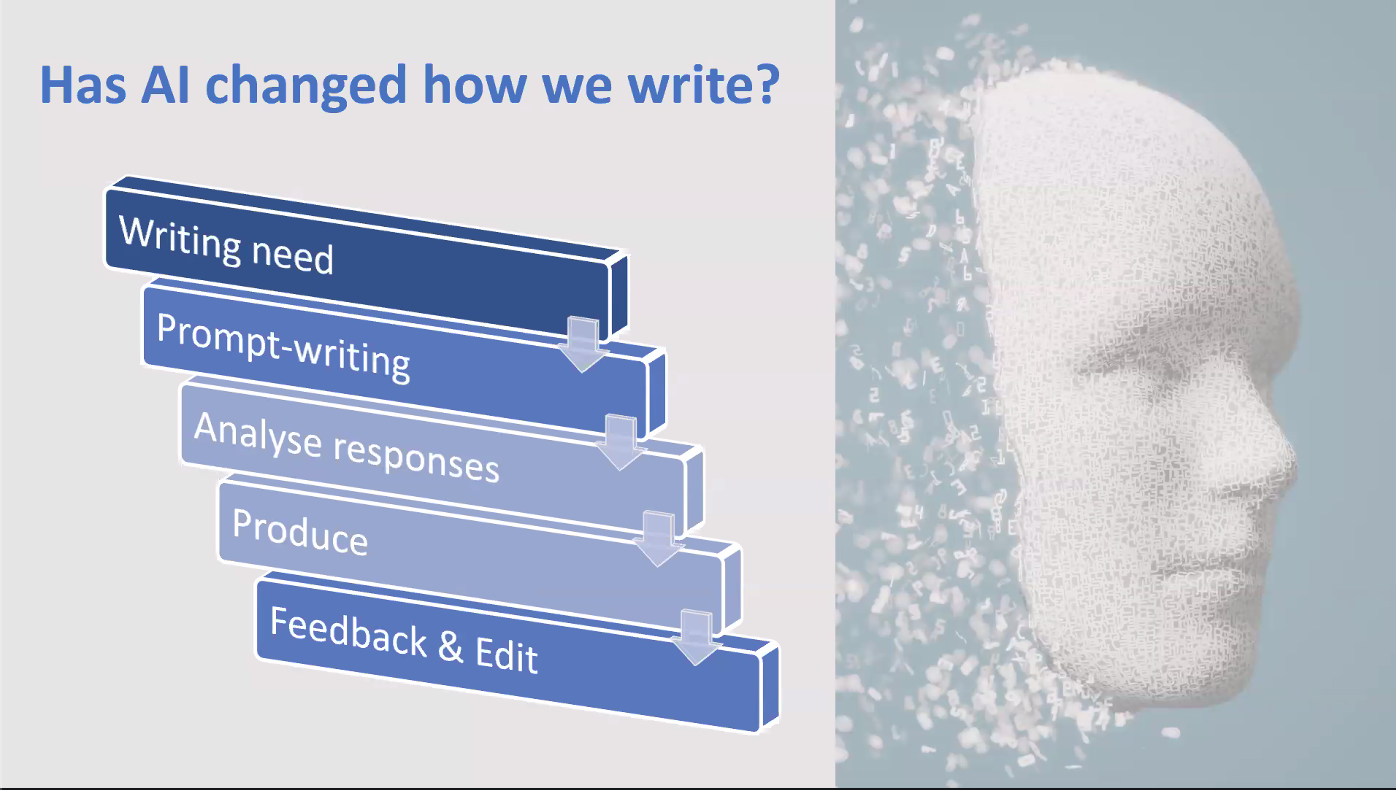
The outline was as follows:

David particularly highlighted the idea of “Help your learners to find/make decisions”, saying that the role of teachers has changed over the years. We used to be arbiters of right and wrong, but now, we are facilitators of learning and discussion, our role isn’t to say what is right or wrong but to show possibilities and allow learners to make choices.

Writing

  • Has AI changed how we write?
  • Has AI changed how students write?

Yes.

Everyone (well, many people) uses it, to varying degrees of success, appropriateness and responsibility. If you don’t use it responsibly and effectively, it does wash out your personality/voice. In order to maintain your voice, you need to know what your voice is.

We have to train our learners on responsible, appropriate, effective use.

Questions we need to ask are: Who is the audience? What is the need (Why are you writing this?)? What role do you play in it? What role should/could AI play in this process?

E.g. a letter of complaint – if you will be all hedging/not cantankerous enough, you could use AI to write it and prompt it to add in some extra cantankerousness. If you are, you probably want your voice in there and will write it yourself. You have choices.

If we’re doing a test, AI is not appropriate unless it is built into the test. However, you could use it for brainstorming, ideation, feedback, suggested language chunks. It can be a learning tool. Most universities acknowledge and accept students using it in that way. What is generally prohibited is using it to produce text and submitting that. This is a change from two years ago and shows how things have evolved.

How do writers come across? How do you want to come across? It’s all about tone and voice.

The question becomes not did you get the grammar/vocabulary correct but is the text produced undeniably written by AI? If it is, it is not successful. If you have just pulled little language chunks from AI, then it could be.

You can teach a whole lesson on voice/tone but David/Mark suggest that is better to embed it throughout the course. Syllabuses tend to be spiral-shaped. Give students chances at multiple stages during the course to reflect and make choices. If we give them chances to do that, they have choices. It’s not a one and done lesson, appropriateness and AI can’t be a one off. It needs to be woven through. It needs to be scaffolded. The rise of AI has made it even more important than before to do this (teach about voice) but it was always important.

Speaking

When you speak, you portray a version of yourself, you make choices.

English learning and using depends on context: I need to be able to… so that I can… .

There is more than one correct way to structure an essay but we teach maybe the most foolproof way, the easiest way.

Hedging – it’s partly using modals, so it’s grammar but it’s also functional (you signal how sure or unsure, how strongly or otherwise you feel towards what you are saying).

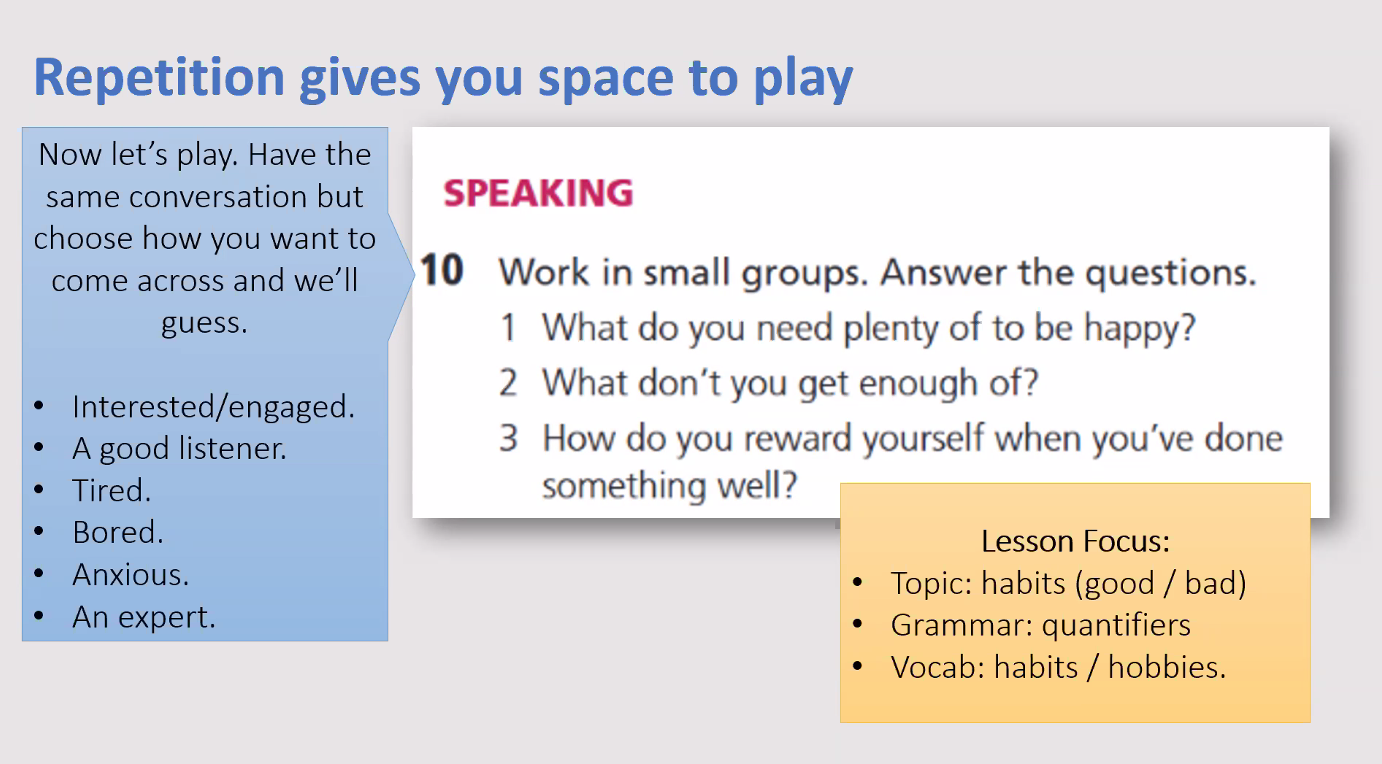
David and Mark shared some possible activities for working with voice/persona by weaving it into existent activities:

If you don’t show interest in what someone is saying, so you just listen and don’t say anything/interject etc, the speaker may feel lack of interest and lose confidence. If you see this happen in a discussion between students of yours, facilitate discussion of these kind of moments – e.g. this happened (X didn’t say or do anything while you were talking), why is that, X? How did you feel about it Y?)

My take-away:

We have seminar discussion exam preparation and then the exams coming up, and I want to try taking this approach to evaluating the example discussion recording (e.g. how did x respond, or not, how do you think y felt?), and to feedback on students’ discussions, and link it back to the language we teach them in order to enable participation. Get them thinking about what kind of persona they want to portray in a seminar discussion exam (e.g. engaged, knowledgable etc) and how to achieve that, as well as get them thinking about how to participate effectively in a real seminar. I might get them to repeat a practise discussion while playing different personas, to give them a chance to experiment.

In terms of writing (we are about to embark on extended essay writing on Monday!), I want to include more discussion of voice and, again, showing them that they have choices over how to express themselves in their essays and how those choices affect the outcome.

I feel I’ve come away with a load of ideas for how to slightly tweak what I already do, and hopefully thereby increase the value of it to my students: I call that a win! 🙂 Thank you Mark and David!

Generative AI and Voice

I’m a writer. I am writing right now! I have written journal articles, book chapters, (unpublished) fiction, (unpublished) poetry, materials, reflections (blog posts), combination summary/reflections of talks/workshops (blog posts) I attend, emails, feedback on students’ work, the occasional Facebook update, Whatsapp/messenger/Google chat messages, and so the list goes on. It is a form of expression, as is speaking, and drawing. These, including all the different kinds of writing I have done and do, are all forms of expression that AI is now capable of approximating. However, until fairly recently (when suddenly it was showing up everywhere!), I had not explicitly considered the relationship between AI generated production and a person’s ‘voice’. Examples of ‘voice’ vs AI can be seen in the two screenshots below:

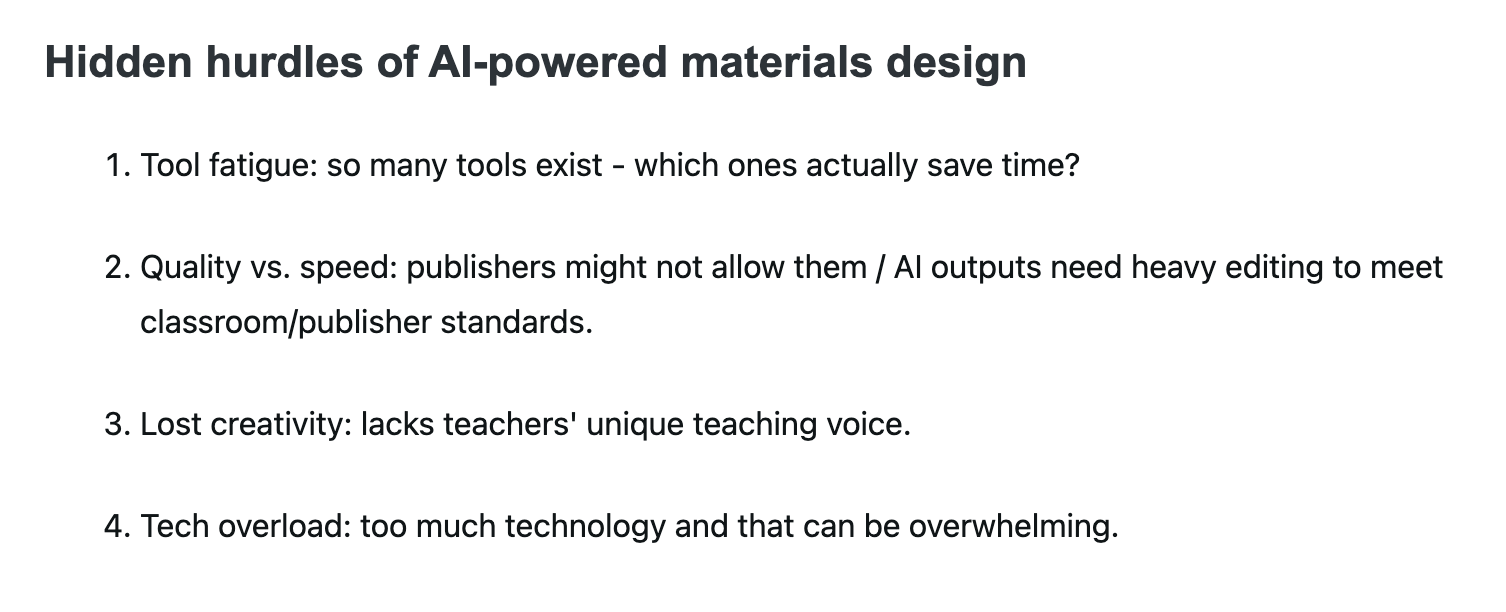
Via an email from Pavillion ELT – abstract of a forthcoming webinar.
Via Sandy Millin’s summary of Ciaran Lynch’s MaW SIG PCE talk at IATEFL 2025.

Both of these screenshots set voice against AI-generated content. The first one (which looks like an interesting webinar – Wednesday 14th May between 1600 and 1700 London time in case you might like to attend!) seems to be about helping learners develop their own voice in another language and suggests that this aspect of language learning is of greater importance in a world full of AI output. The second is in the context of materials writing, and highlights an issue that arises in the use of AI in creating materials – “lacks teachers’ unique voice”. The speaker goes on to offer a framework for using AI to help with materials writing while avoiding the problems listed in the above screenshot. (See Sandy Millin’s write up for further information! The post actually collects all of her write-ups of the MaW SIG 2025 PCE talks in a single post – good value! 🙂 )

I teach academic skills including writing to primarily foundation and occasionally pre-masters students who want to go on and study at Sheffield University. In the last year, we’ve been overhauling our syllabus, partially in response to one of our assessments being retired and partially in response to the proliferation of generative AI. Our goal is to move from complete prohibition of AI to responsible use of it. And I suppose, one thing we hope to achieve from that is reach a point where students may or may not choose to use AI in certain elements of their assessment but actively avoid it in others. This, I think, has some overlap with Ciaran Lynch’s framework for writing materials:

Via Sandy Millin’s summary of Ciaran Lynch’s MaW SIG PCE talk at IATEFL 2025.

Maybe we need a similar framework/workflow for our students that succinctly captures when and how AI use might be helpful and when it is to be avoided. And I think voice is part of the key to that! But what exactly is voice? In terms of writing, according to Mhilli (2023),

“authorial voice is the identity of the author reflected in written discourse, where written discourse should be understood as an ever evolving and dynamic source of language features available to the writer to choose from to express their voice. To clarify further, authorial identity may encapsulate such extra-discoursal features as race, national origin, age, or gender. Authorial voice, in contrast, comprises, only those aspects of identity that can be traced in a piece of writing”.

[I recommend having a read of this article, if you are interested in the concept of voice! Especially regarding the tension between writers’ authentic L1 voice and the constraints of academic writing in terms of genre and linguistic features (which vary across fields).]

In terms of essay writing, and our students (who are only doing secondary research), if they are copying large chunks of text from generative AI, then they are not manipulating available language features to express meaning/their voice, they are merely doing the written equivalent of lip-synching. I think this is still the case if they use it for paraphrasing because paraphrasing is influenced by your stance towards what you are paraphrasing and how you are using the information. I suppose students could in theory prompt AI to take a particular stance in writing a paraphrase or explain how they plan to use the information but they would also need to be able to evaluate the output and assess whether it meets that brief sufficiently. In which case, would it save them much time or effort? Would the outcome be truer to the student’s own voice? I wonder. Of course, the assessment’s purpose and criteria would influence whether not that use was acceptable.

On the other hand, if students use AI to help them come up with keywords for searches and then look at titles and abstracts, and choose which sources to read in more depth, select ideas, engage with those ideas, evaluate them, synthesise them and organise it all into an essay, using language features available to them, then that incorporates use of AI but definitely doesn’t obscure their voice and the ownership of the essay is still very much with the student rather than with AI. They could even get AI to list relevant ideas for the essay title (with full awareness that any individual idea might be partly or fully a hallucination), thereby giving them a starting point of possible things to consider, and compare those with what they find in the literature. This (and the greyer area around paraphrasing explored above) suggests that a key element that underpins voice is that of criticality. Perhaps we could also describe it as active (and informed) use rather than passive use.

Another issue regarding voice in a world of AI generated output, which I have also come across recently lies in the use of AI detection tools:

From “AI, Academic Integrity and Authentic Assessment: An Ethical Path Forward for Education

If ESL and autistic voices are more likely to be flagged as AI generated content, then our AI detection tools do not allow space for these authentic voices. These findings point to a need to be very careful in the assumptions we make. I’m sure we’ve all looked at a piece of work and gone “this was definitely written by AI, it’s so obvious!” at some point. Hopefully our conclusions are based on our knowledge of our students, and their linguistic abilities, previous work produced under various conditions and so on. However, for submissions that are anonymised this is no longer possible. I think, rather than relying on detection tools, we need to work towards making our assessments and the criteria by which we assess robust enough to negate the need for such tools. Either way, the findings would also suggest that the webinar described in screenshot no. 1 may be very pertinent for teachers in our field. (I wonder if the speakers have come across instances of that line of research too?! I increasingly get the impression that schedule-willing, I may be attending that webinar!)

Finally, this excerpt from a Guardian article about AI and human intelligence I think provides perhaps the most important reason for helping students to develop their voice and not sidestep this through use of AI:

“‘Don’t ask what AI can do for us, ask what it is doing to us’: are ChatGPT and co harming human intelligence?” – Helen Thomson writing for The Guardian, Saturday 19th April 2025

We want those Eureka moments! We want the richness of what diversity of thought brings to the table. (It is baffling to see Diversity, Equality and Inclusion initiatives being dismantled willy nilly in the U.S. – everybody loses out from that. But then, so much of what goes on these days is baffling.) Maybe something small we can do is help our students realise that their voice, as every voice, is important and that diluting it and losing it through ineffective use of AI makes the world a poorer place. I haven’t even touched on AI and image production or AI and spoken production but this blog post is long enough already (maybe I should have got AI to summarise it for me! 😉 ) so I will leave that for another post!

Using Adobe Firefly for Image Generation

Have you used Adobe Firefly before? Me neither. But we have free access to it via the University and the TEL team has used it, and so did a session for us on it. It can be used to for images to put in lesson handouts and slides, but also online platforms like Wooclap and Quizlet.

You write a prompt in a box and it generates images.

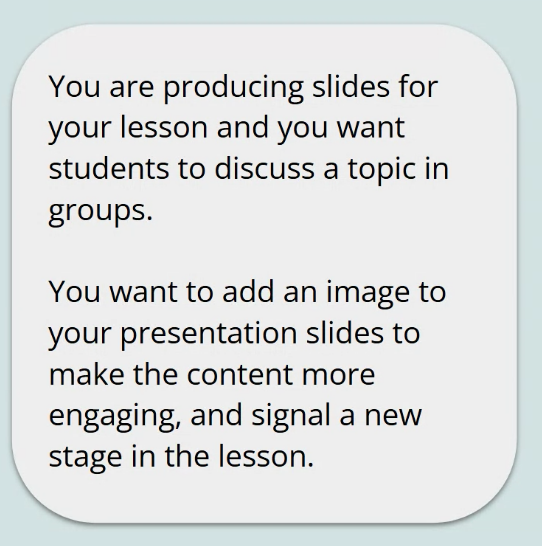
This was a scenario given to us:

Prompt 1: an image of 4 students in a discussion. This was the result:

Issues: There are 3 students and teacher. They look quite young while we teach university age students. Three of them are blonde so it isn’t a good representation of our students. So this is an example of the bias that exists in AI in an automatic result with no detail prescribed in the prompt.

Prompt 2: an image of 4 university students from diverse background in a discussion. This was the result:

Problems: They are not in a classroom.

Adding “seated” (to be more typical of a classroom):

Not a perfect picture (looks a bit like an airport…) but better than the first picture! In terms of the purpose of generating the image, this would probably work. Prompt writing/editing for Adobe Firefly tends to take multiple iterations before you get something you might be happy to use.

We were given the following tips:

  • add more detail to get better results;
  • be aware of bias as you engineer prompts and evaluate the outcome;
  • be picky – it may take several iterations to get what you want. Sometimes a fairly simple prompt immediately yields a satisfactory outcome but usually it takes a bit more effort. Particularly to produce an outcome that is suitably representative for an international student population.

Adobe Firefly has a lot of stock images that it draws on which means the quality is better than similar counterparts.

Once you have generated an image you can also edit it to a certain extent. Which is good as the first images you get can have arm melds, funny shaped heads and so forth! It’s not very good with limbs. A central human image may be fine but anyone in the background or if you require groups/more people, then problems abound! Despite these issues, Firefly is better at it than Gemini.

So al very cool but actually stock images like Pixabay (and creative commons licensed like Flickr – in particular ELTpics – if the context is suitable), i.e. human generated, are much less resource-intensive to use. So, don’t get too carried away by the “it’s so cool” thing. I tend to use Google image search and the appropriate level of license filter, personally.

My general impression: I can’t currently see an Adobe Firefly – shaped hole in my life that needs filling. I wonder if in 5 years time I will look back on this post with an “oh you innocent child” type lens or not?! Time will tell! It was a good session though, after being shown the prompts and pitfalls, we went into a breakout group and had to come up with prompts for another scenario. Unfortunately in my group, none of us had access sorted out yet so we couldn’t test the prompts we wrote.