
This was the title of the English with Cambridge Webinar that I watched today (linked so you can watch it too – recommended!) It’s divided into 3 parts – what autonomy is, activities learners can do with Gen AI to learn autonomously and risks to avoid. This post will offer a brief summary of that, followed by some ideas and thoughts of my own.
The first activity is to design an autonomous learner, sharing ideas in the chat. The usual kind of things came up – motivation, confidence, agency, enthusiasm. These wre compared with the literature e.g. Holec (1981) – “the autonomous learner can take charge of their own learning” but the speaker said we need to unpackage and update this. So that, it does involve the ideas that were put in the chat, as well as ability to manage their time and resources, awareness of learning strategies, resourceful (e.g. would think to ask an AI chatbot) but also critical (won’t just accept the response without evaluating it). However, teachers are also very important in the process – autonomous learners aren’t born but are made, with support from teachers. This is important because if you are autonomous, you will achieve better results and improve more quickly. Also, autonomy is important beyond language learning, in the work place, in personal lives etc – it is a lifelong learning and living skill. It goes hand in hand with critical thinking, which is also a key skill. You are also likely to be have better confidence and self-esteem.
The other speaker reminds us that most AI tools require users to be a certain age. E.g. ChatGPT is not for under 13’s and 13-18 year olds need parental consent. So, if you do any activities with students, ensure they are old enough to use them and whether you need parental consent. Then some activities:
- Using the Chatbot as a writing tutor. This is a back and forth process, where the student asks the Chatbot to highlight the mistakes but not correct them. The student then tries to correct the mistakes and repeats the activity. They need to tell the Chatbot explicitly not to correct them. This could go through several iterations until the learner has had enough, at which point they prompt the Chatbox to explain the mistakes. “What about this sentence? What is wrong with it? <sentence>” NB: the Chatbot can make mistakes – it can say there are mistakes when there aren’t.
- We were shown a sort of tabulated study plan for improving writing and asked what we think the prompt might have been to generate it. Critically: if you want something useful, you need to be very detailed in your prompt to get something useful back from the Chatbot. It was something along the lines of “My teacher says my writing has xyz problems, and I want to take a B1 writing test in 4 weeks. I will have to write x and y. Can you make a study plan for me in a table. Can you include information about what I should do and what resources I should use.”
- Similar to the above, we were shown a visual idiom guide and asked what we thought the prompt was. It was something along the lines of “I have to learn these phrases for next week. I’m not a patient student and I think I have dsylexia. Can you suggest some study guides. <Phrases>.
- Intonation – Voice chat in ChatGPT. You speak into your phone and you get audio back. “I’ve got to do a presentation. I think my intonation is flat. Can you help me? <Short extract from presentation> And ChatGPT can make suggestions. You can keep going back and forth. Say it again and ask for further suggestions.
(I recommend watching the webinar to receive a full presentation of these ideas!)
The final part of the webinar deals with the risks of using AI and how to avoid them. There was a poll asking “Has AI ever misunderstood you?” – There were a lot of answers with “yes”. AI is not faultless and doesn’t always understand. Then we are asked to think about what overreliance on AI might look at. Lack of creativity, quite formulaic answers, repetitive were ideas that came up from the audience. To avoid these risks, we need to train learners not to use AI too much. This is also where critical thinking comes in – learners need to be able to make effective choices in use of AI. We want learners to be confident users of AI but in a critical way. We want them to be thinking and reflecting on things like is AI useful, is it doing what it needs to do. Questioning them regularly, getting them to keep a journal of keeping it – when they used it, why, the result, would they use it again – to get them to think about how effective it is. Offering yourself as a resource in terms of support in using AI, that learners can talk to you and get advice when they want to. Cambridge Life Competencies Framework was talked about – there are freely available activities to use with students.
An example activity from this:
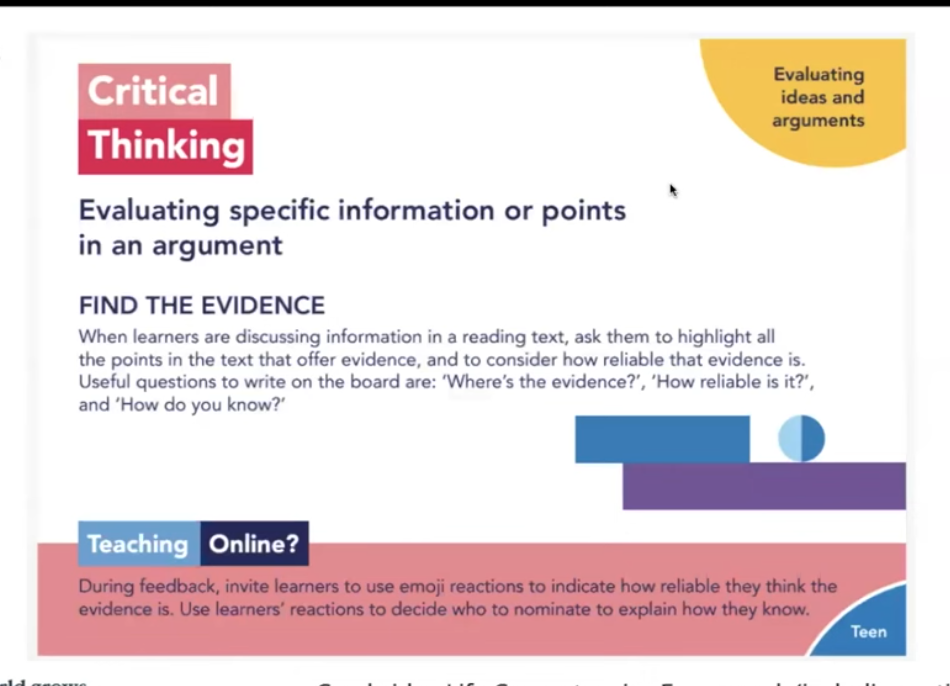
This can be used on a text that Generative AI has produced, to encourage students to question what is produced.
Another activity was to ask students to use for a chosen stage of a task. They should explain where they will use it, why they decided to use it for that stage of the task and then reflect on the outcome. This should be a supportive, encouraging environment. The key thing is encouraging reflection.
The final question was “Are you an autonomous learner?” directed at us teachers. We need to build up our knowledge and understanding of things like AI. This will enable us to be able to give support and advice to students. Turn activities into your own, adapted to your own context. We should also be a learning community in terms of AI, as it is new for us all. This would create a supportive environment rather than one of fear for using it in the wrong way.
The webinar concluded with 3 things to keep in mind: Purpose – you need a reason for using AI, don’t use it for the sake of it or because you think you should. Have a plan. Make it sure it fits the purpose. Privacy – any data that you put into GenAI chat becomes part of the data that the Chatbot uses. So anything you put it can be repeated to other users. Therefore don’t enter personal data about you, your learners or anyone else into it. You should also not put copyrighted things into it if you don’t own it. Planet – the use of GenAI has an effect on sustainability in terms of the environment and society as a whole.
My thoughts and ideas
The first thing that I couldn’t help thinking was that when I was learning Italian intensively and autonomously in the summer of 2014, I would have LOVED to have had access to GenAI! Being able to get instant basic feedback on my writing would have been very cool. I wonder how competent I would have been at handling the feedback i.e. at identifying which parts were valid and which parts were sketchy.
There’s also an AI tool we learnt about in one of the AI professional development sessions delivered at work, Google Notebook, where you can feed it a bunch of content and it converts it into a podcast which is a discussion between 2 “people”, in passably natural spoken language. It is called a “Deep Dive”. The usual AI caveats apply, in that what it churns out in the podcast may not be accurate to what was fed to it and it might make stuff up. Personally, I would have loved using it for Italian learning though. It would be really good for generating content to listen to, using topics and vocabulary that you have some familiarity with. You could read the texts in preparation. I don’t believe this is the intended purpose of the tool (it is supposed to be a research assistant, and you are effectively outsourcing reading and summarising texts to AI) but it would be a very good use of it! It would also mean the issue of accuracy was less acute, given the purpose of listening to the podcast/summary would be to practise listening rather than to make high stakes decisions based on that output!
Where I work, we’ve mostly been coming at it from the perspective of how to conduct assessments in a world where AI exists and students use it in the production of their written work. Being part of a university, the first stage was waiting for there to be university policy on it. Now we are at the stage of being able to integrate the policy into our programme. It is still a slow process as there is a lot of procedure to follow when you bring in new things. We are shifting from a zero tolerance policy, which obviously was not very effective but all we had to be going on with, to identifying how and when AI could be used effectively in students’ learning and where the boundaries are. We want to integrate positive use into lessons, which echoes what this webinar was saying. By modelling effective use and giving students opportunities to use it with support, and highlighting its limitations, we hope to help them become more AI literate and therefore less likely to use it in detrimental ways. Maybe at some point we will have to teach them about Google Note and the limitations of it, since it is likely something that they could use at university as part of their process.
It is nice to be moving towards a position in which we can acknowledge the positive elements of AI. Of course, as quickly as we adapt, so quickly will it continue to evolve. (The tools we learnt about in the session where we learnt about the “Deep Dive” – wow! I may turn my notes. or at least some of them, from that session into a future blog post…) I think, going back to the webinar at the root of this post, one of the great things about it (the webinar, that is) is that the skills and criticality, and ideas for teaching those which were presented, will continue to be equally relevant even though the ideas for using the AI itself will change and evolve. As for the part about learner autonomy, in my view they nailed it – it was so good to see them discussing it as something to bring into the classroom and develop (I have done a lot of work on that in my career – through classroom research, through publication, through conference presentations and webinars) rather than something that learners are or aren’t. So, as I said before, it IS definitely worth a watch! Also worth taking some time to look at the Cambridge Life Competencies framework and resources attached to it.


 Lizzie Pinard